 Skip to content


OrbitRows lets people and AI agents read and change their structured data (spreadsheets, store exports, CSV files) with plain-text prompts. It turns each request into checked SQL, asks when it isn't sure, and keeps every change undoable until it's saved.
OrbitRows
Status
Working prototype
Period
26 Sep 2026 — 3 Nov 2026
Time invested
21 working days
Technologies
SQLite · SQL · JEV · GLiNER2
Category
Product · Data
Repository
aminesayagh/orbitrows-cliProgramming language
Python
01Overview and quick facts.
Most of the world's business runs on tables. A shop's products, a supplier's price list, a warehouse's stock, a year of sales. And they hold answers people need every day. Yet the moment a question goes beyond a simple filter, or a change has to touch hundreds of rows at once, those answers sit behind a wall of formulas, and the people who understand the business best are rarely the ones who can get through it.
Language models promised to bring that wall down, and they came close. A model can write a query in seconds. But it writes it with the same confidence whether it's right or wrong, and a confident mistake on a live price list is worse than no help at all. For anyone responsible for real data, "usually right" isn't good enough.
Then a different kind of AI arrived. Models like Jev don't try to write the answer: they make judgements. Asked a precise question, "does this phrase choose rows or change them?", they answer with a choice and an honest measure of how sure they are. That changes what can be built. Common sense becomes something software can call, like a function.
OrbitRows is built on that shift. It lets anyone, person or AI agent, read and change their structured data simply by saying what they want. Behind each request, the AI makes the judgement calls: How? One small question at a time.
02The problem.
Every business runs on a simple loop: see what's happening, decide what to do, act on it. The closer those three stay together, the better the decisions.
The people who understand the business know exactly which question to ask and which change to make. But the data lives in systems they can't work with directly, so they have to hand the work over: to a developer, an analyst, an agency, a technical colleague. That person knows the tools, but not the business. Something gets lost at every handoff: the nuance of the request, the reason behind it, the exception everyone in the shop knows and nobody wrote down.
So quality drops, in a way that's hard to see. The request comes back slightly different from what was meant. It takes days instead of minutes. Checking the result takes as much effort as asking for it. Soon the business stops asking the questions that aren't worth the wait, and decisions go back to instinct, with the data sitting right there, unused.
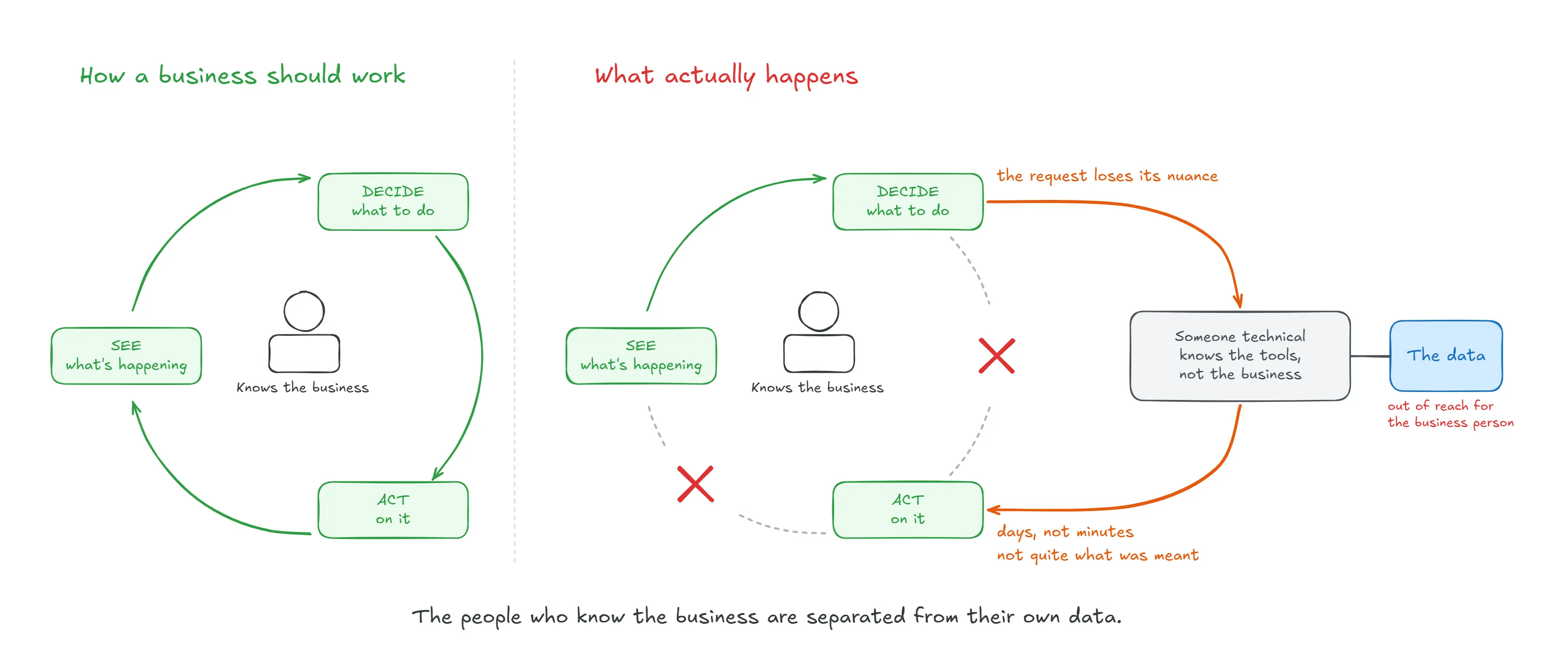
The real cost isn't the technical work itself. It's that the people who know the business are separated from their own data, and the people between them and it can never fully carry what they know.
AI promised to remove that middle step, but a model that writes queries with confidence, right or wrong, doesn't remove it. It only moves the problem: someone technical still has to check the work. The loop stays broken.
Closing it takes something a business owner can use directly and trust without having to read SQL.
03Goal and scope.
The goal is simple: put a business owner's data back in their hands, and let them change it safely, in their own words.
Getting there meant saying no to a lot, on purpose. These are the lines we drew for this version.
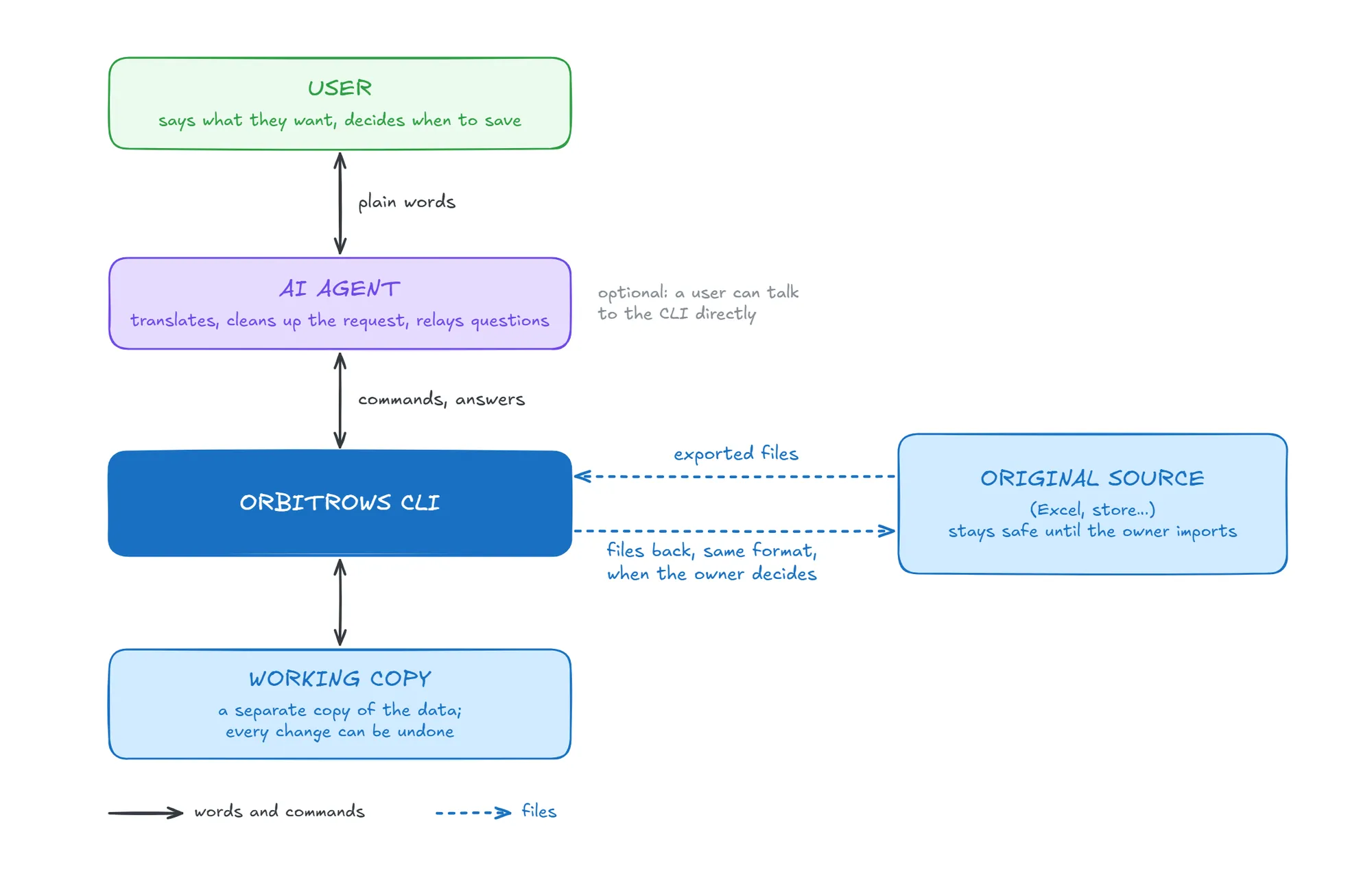
We work on a copy, not on the live system
OrbitRows doesn't connect to a live Excel sheet or a WordPress store. It works on a separate copy of the data, and that's a design choice more than a limitation.
The original stays untouched. The business owner can explore, change their mind, and try again in a working session, and nothing reaches the original until they've finished and decided to keep the result. For someone responsible for real prices and real stock, that's what makes it possible to try at all.
Integration is an import and export problem, and it's already solved
Connecting to every platform would be a project of its own, and it isn't where the value lies. Almost every platform can already export its data and import it back. So we rely on what exists, and we put our effort where nobody else does: taking the exported files, doing the work on them, and giving them back without losing anything.
That last part is the promise. The files come back in their original format: same names, same structure, same encoding. Before a store is even created, the import proves it can rebuild every file exactly from what it stored. If it can't, nothing is written.
English, well-written, for a reason
This version understands English, written properly. That sounds narrow until you look at who's at the other end.
OrbitRows is built to be used by AI agents through a command-line tool and a skill, as the main interface, even if it is accessible for people directly. An agent can already do what a model does best: translate from any language, fix spelling, turn a rough idea into a clear sentence. Doing that again inside OrbitRows would add cost and risk for nothing. We rely on what the AI in front of us already gives, and focus on the part it can't do alone: getting the data right.
Versioning where it matters
Inside a working session, every change can be taken back, one step at a time, until the owner saves. That's the moment when undo matters most, so that's where we built it.
After saving, we don't keep a browsable set of versions. Every request is recorded in the store's history, and that's enough: any earlier state can be rebuilt by replaying the requests that led to it.
One local database, and the limits of SQL
The working copy lives in SQLite, a database stored as a single file on the user's own machine. That's what makes OrbitRows simple to install and private by default: there's no server to run, and the data stays on the machine.
It also sets the boundaries of this version:
- What SQL can't express, OrbitRows can't do. Every request ends as one SQL statement, so work that goes beyond it, such as sending a document, generating an invoice, or running a long calculation step by step, is out of scope. SQLite also has fewer built-in functions than larger databases: statistics such as a median aren't available directly.
- One user at a time, on one machine. Each store has one working session. It isn't built for a team editing the same data at once.
- Files of a reasonable size. A file can be up to 50 MB. That covers most exports from a shop or a spreadsheet, but not a large company's full history.
04The solution.
The idea at its heart: AI makes the judgement calls, and code does everything exact. The model never writes the query. It answers small, precise questions with a measure of how sure it is. Code builds the query from those answers and checks it before anything runs.
What it can do today
Import and export
- Import data from CSV files
- Organise repeated records into related tables to be joined
- Export the files back in their original format
Work with an additional file
- Add another file next to the data
- Compare it with the data (demo)
- Update or add records from it (demo)
Work on the data in plain language
- Read, update, and delete records
- Read, update, and delete the schema parts of the tables (demo)
- Generate a profiling of the imported data
- Manage structured format of values, numbers, dates, and units
- Reach across related tables
- Handle several requests in one message
Stay in control
- Ask when a request isn't clear
- Refuse, with the reason, what can't be done safely
- Undo any change, step by step
- Save only when the user decides
- Keep unsaved work through an interruption
What happens inside, from a message to a result
The CLI has five big parts.
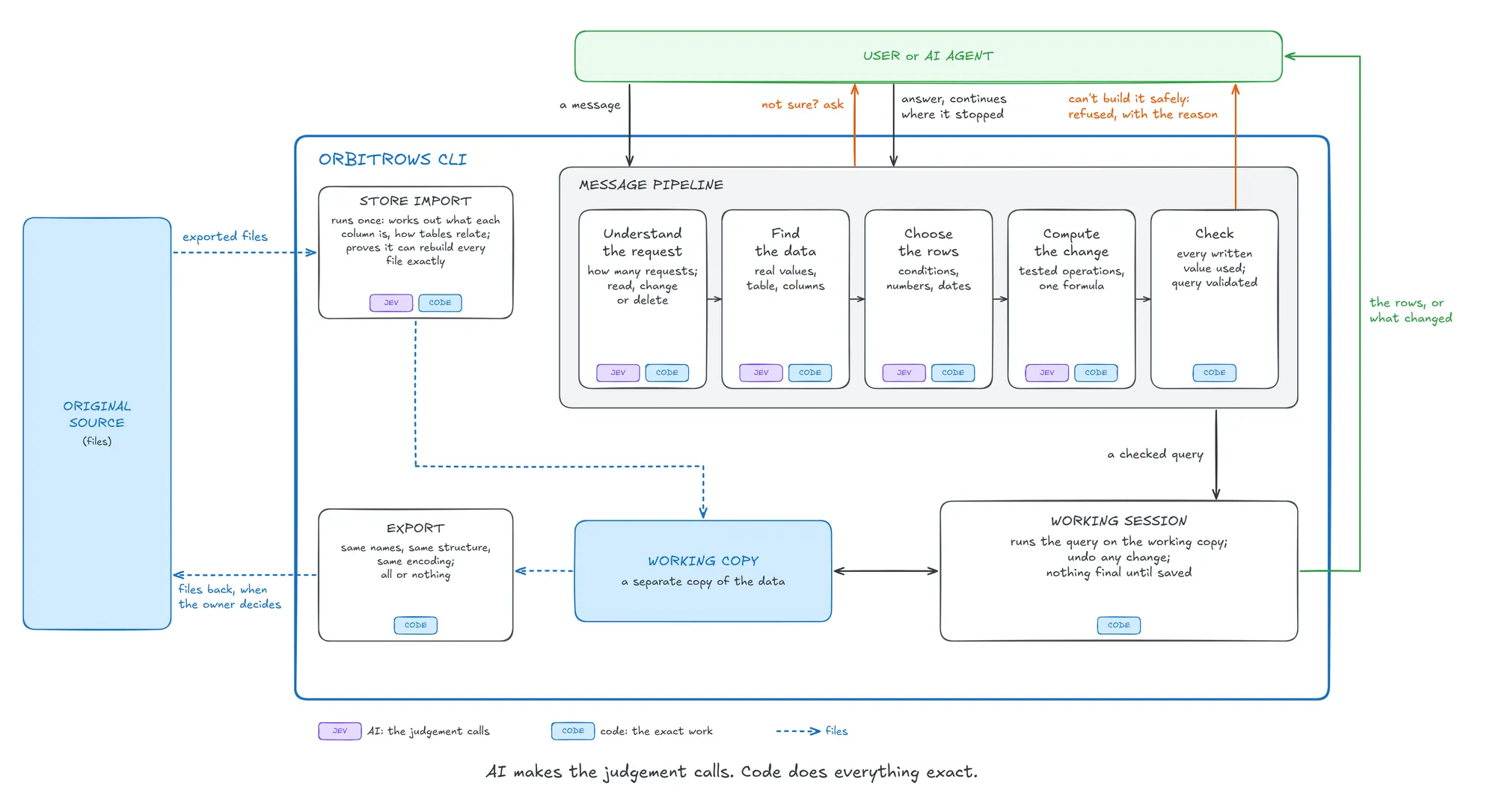
1. The store import.
It runs once per store. It reads the files, then works out what each column is (a key, an amount, a label), which units its header declares, and how the tables relate. It profiles every column: its empty cells, its values, its dates. Then it builds the tables and proves it can rebuild every file exactly. If it can't, nothing is written.
2. The message pipeline.
This is the core: it turns a sentence into a query, step by step, and each step adds one answer.
- Understanding the request: is it about the data at all; how many requests does it hold; how are they linked; does it read, change, or delete?
- Finding the data: which words are real values in the store (proven by searching for them); which table; which columns?
- Choosing the rows: which conditions, combined how, with numbers and dates read by dedicated readers, never estimated by a model.
- Computing the change: each calculation is matched to a tested operation from a catalog, then assembled into one formula from the structure of the sentence.
- Checking: every number, date and value the request wrote must be used by some part of it. If one went missing, the request isn't built. Then the query is built and validated.
3. The question loop.
Whenever a judgement isn't sure enough, the pipeline stops and asks, with options. The answer is kept, and the message continues without paying for what's already decided. If an AI agent is the one calling, it answers what the user has already settled and relays the rest.
4. The working session.
One background process per store holds every change open. Each change can be undone on its own, and an interruption loses nothing: unsaved work comes back with the next command. Nothing is final until the owner saves.
5. The export.
The tables are turned back into the original files: same names, same structure, same encoding. It's all or nothing: if one file can't be written, none is.
05Architecture and tools.
OrbitRows is a command-line tool, written in Python, for working on a store's data in plain English. It imports a store's CSV files into a SQLite database. It then takes a message such as "lower the price of the black variants by 5%", turns it into SQL, and runs that SQL on a working copy of the store. Every change can be undone, and nothing is saved until the session ends.
Between the message and the SQL sits a pipeline of steps. Each step answers one narrow question: how many requests the message holds, which column a word names, or which rows a condition keeps. It passes a typed result to the next step. When a request can't be built completely, it is refused with its reason rather than approximated.
The tool is built in six layers. Each layer has one job
Interface
The interface is the orbitrows command line interface, few of it command are:
orbitrows store: imports a store's CSV files into a SQLite database.orbitrows message: takes a message in plain English and converts it to SQL.orbitrows answer: answers a question the pipeline asked.orbitrows undo: takes back the last change.orbitrows exit: ends the session.
It holds no state of its own: each command finds or starts the store's session and passes the request to it. When the caller isn't a person at a terminal but an AI agent, the command answers with a guide that tells the agent how to answer the questions.
- Python 3.13: the language the whole tool is written in.
- uv: the package and environment manager. It installs the dependencies and runs the tool and its tests.
Session
The session is a background process, one per store, started by the first command. It holds one open transaction on a working copy of the store. Each change runs in its own savepoint, so undo rolls back exactly the last one. Each change is also written to a journal on disk: if the process crashes or is left idle, the next session replays the journal and nothing is lost, the execution of sql don't guarantee the consistency of the data on that case, but it good enough. The work is saved into the store only when the session ends on orbitrows exit or when the terminal closes.
- SQLite: the database engine. It is a single local file with no server.
Import pipeline
The import pipeline turns CSV files into tables. It detects each file's encoding and reads its header and column types. It then classifies the columns step by step: the unit a header declares, what each column is (a key, a measure or a label), and which repeated records belong in a table of their own. The tables are proven before anything is written: each file must be rebuilt exactly from them.
- charset-normalizer: detects a file's text encoding (UTF-8, Latin-1 and others), so that accented names are read correctly.
- GLiNER2: a small local model that finds named spans in a text. Here it reads what a header declares, such as the unit in "Weight (kg)".
- Jev: TypeSafe's System One model. It answers typed questions, either a choice among options or a yes/no, each with its probability. Here it decides each column's classification.
Message pipeline
The message pipeline turns a message into SQL, and it depend on the classification python tools for decision accuracy.
- spaCy: a library that parses a sentence's grammar (subjects, verbs, clauses). It finds the words that point back to earlier ones ("them") and the structure of conditions and operations.
- GLiNER2: the same span model as in the import. Here it proposes where to cut a message into requests.
- sentence-transformers: a library that turns a text into a vector, so that texts are compared by meaning. Two models are used:
- MiniLM (paraphrase-multilingual-MiniLM-L12-v2) matches a phrase to the values a column holds.
- bge-small-en finds the ten catalog operations closest to a request.
- RapidFuzz: measures how close two strings are, so that a misspelled value ("blak") still matches the stored one.
- NumPy: the numeric library that compares the vectors.
- Jev: here it confirms each cut and link, and picks a column, a value or an operation among the candidates the steps found.
Shared readers
The shared readers do the work that must be exact, and both pipelines use them. They read numbers, number words, units and dates from text, and they build SQL as a tree before writing it as text, so that the statement can be checked first.
- Duckling and python-dateutil: Duckling reads a date phrase, and dateutil does the date arithmetic and parses the formats found in CSV files.
- Pint: a units library. It knows that "kg" and "g" measure the same quantity and converts between them.
- text2num: turns number words into numbers ("twenty-five" → 25).
- Lark: a parser generator. It defines the grammar of the quantity reader ("5%", "10 more", "half the cost").
- Babel: reads numbers written in a locale's own format, such as "1.234,5".
- Duckling: an open-source service that reads dates and durations in text ("last Friday", "in two weeks"). It runs in a Docker container that the session starts when needed.
- SQLGlot: a SQL parser and builder. The SQL is built as a tree and written in SQLite's dialect.
- Pydantic: typed data models. It describes the store's schema and checks the pieces the pipeline builds.
Model client
The model client is the single door to Jev. Every question a step needs answered goes through it. It records each answer, so a message that paused on a question runs again without asking Jev a second time. An answer below the confidence threshold becomes a question for the user. Because the client is a small interface, another model can replace Jev without touching the steps.
- typesafe-sdk: TypeSafe's Python client. It sends the typed questions to Jev and returns each answer with its probabilities.
What runs where
Everything runs on the user's machine except Jev. Duckling runs locally in Docker. The local models are loaded once, when the session starts, so a message takes about 4 seconds: about 2 seconds of local work and about 2 seconds of Jev.
06From a message to SQL.
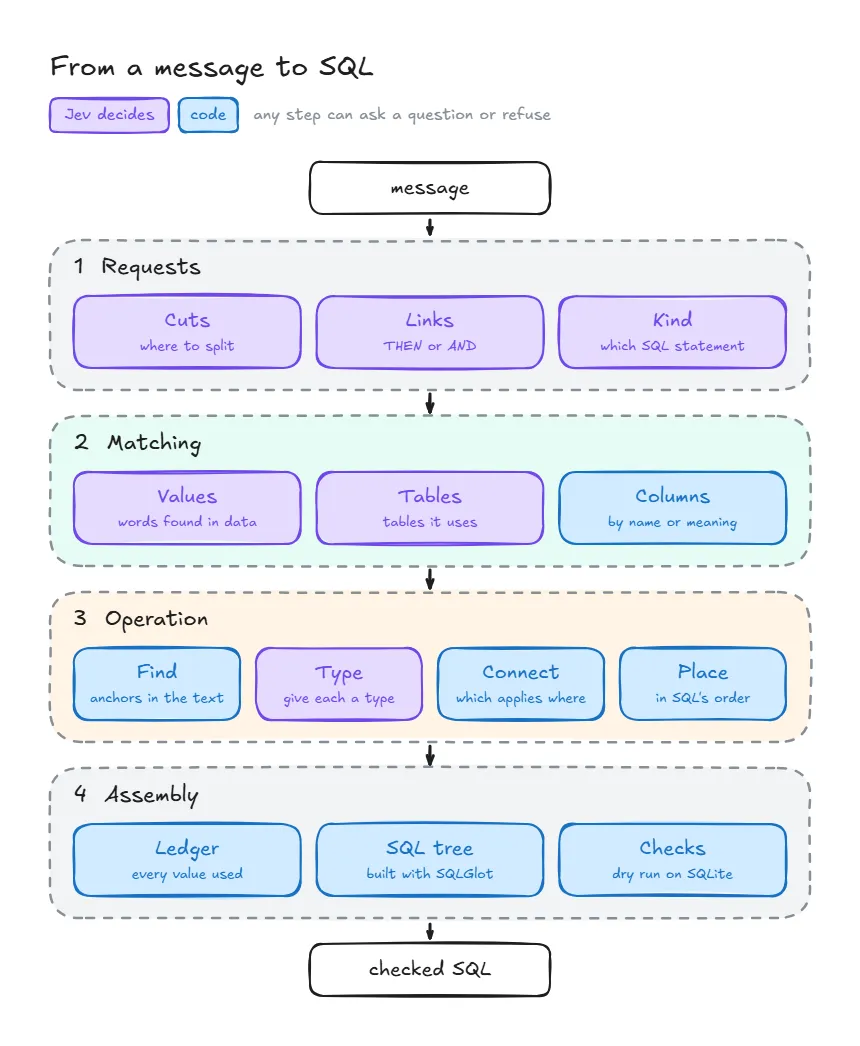
A message goes in, and a SQL program comes out: one statement per request, checked but not yet run. Between the two are four steps. The first finds the requests in the message, the second ties their words to the store, the third builds what each request does, and the fourth assembles and checks the SQL.
Each step builds on what the earlier ones found, and each can stop the message in one of two ways: a question, when an answer is not sure enough, or a refusal, when the request can't be built completely.
Step 1: Requests
A message can hold several requests, and the first step finds them, orders them and says what kind each one is.
Words that point back. spaCy proposes every phrase that could point to something else ("them", "their", "that one", "the copies"). For each one, Jev says what it points to: an earlier phrase, new rows a request creates, or nothing.
"Find the black variants and lower their price by 5" → "their" points to "the black variants".
Cuts. GLiNER2 proposes where one request ends and the next begins, and Jev confirms each cut. A cut is kept only when Jev is at least 0.8 sure, because a request wrongly cut in two can't be built.
"Lower the price by 10%, rounding to the nearest 5; then show the cheapest variant" → the comma is not a cut ("rounding" belongs to the change), the semicolon is.
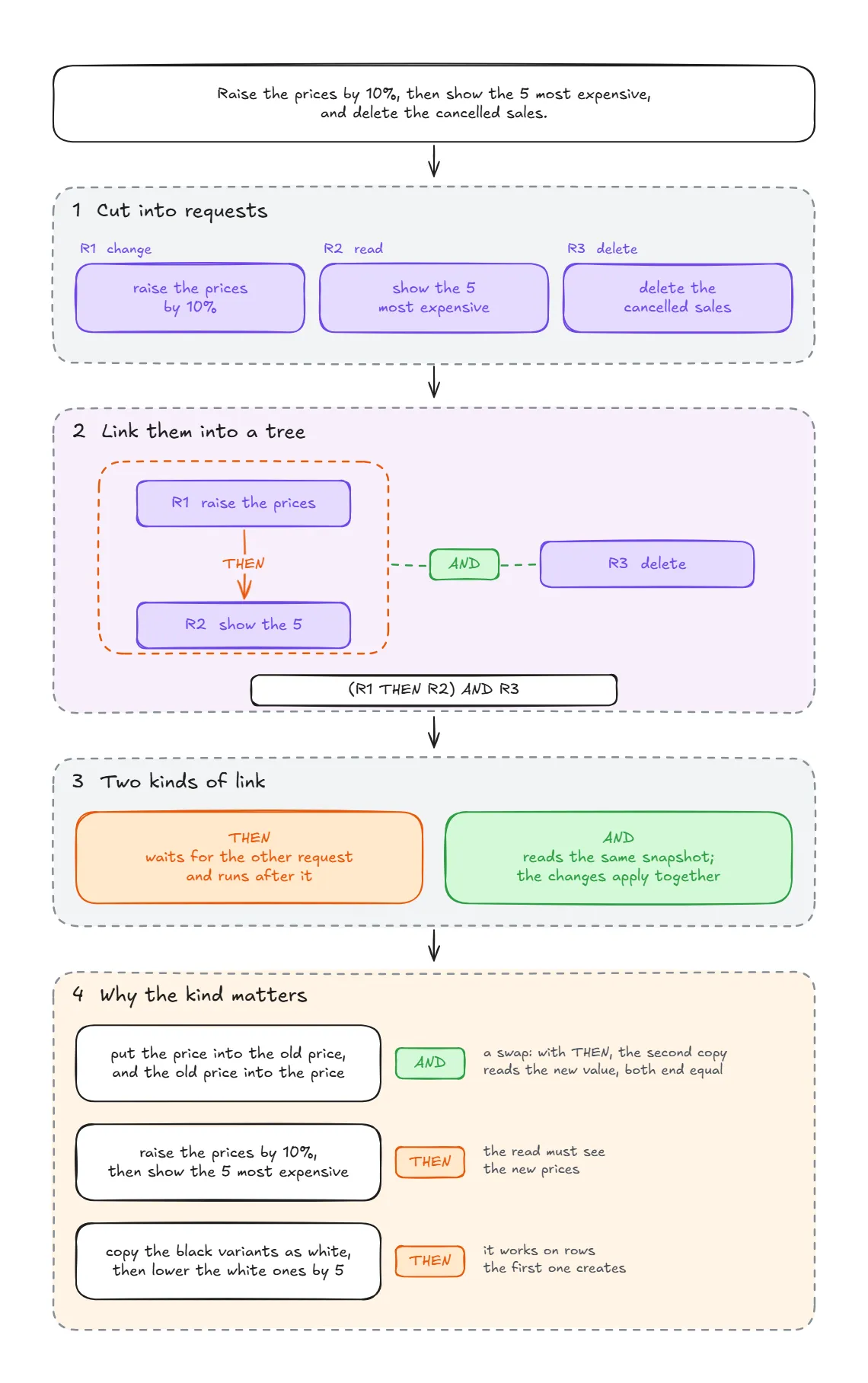
Links. The requests form a tree, and each link is one of two kinds:
- THEN: the second request waits for the first and runs after it. This is needed when it reads what the first one changed, or the rows the first one returned.
- AND: the requests read the same snapshot of the store, and their changes apply together.
The difference changes the result:
- "Put the price into the old price and the old price into the price" is a swap. It needs AND so that the second copy wouldn't read the value the first one wrote, and both columns would end up equal.
- "Raise the prices by 10%, then show the 5 most expensive" needs THEN: the read must see the new prices.
- "Copy the black variants as white, then lower the white ones by 5" needs THEN: the second request works on rows the first one creates.
Kind of request. Jev says which SQL statement each request needs: a read (SELECT), a change (UPDATE), a deletion (DELETE) or an addition (INSERT). The rest of the pipeline is shaped by that answer.
Step 2: Matching
The second step ties the request's words to the store: its values, its tables and its columns.
Values. GLiNER2 proposes the phrases that could be stored values, and Jev says the role of each one. It can be a value to look up ("the black variants"), a new value to write ("set the colour to navy"), a number, or not a value at all. A value to look up is searched among the column's stored values: exact first, then misspelled ("blak"), then contained in a longer value. A value that is found nowhere is never assumed.
"Show the Orbit tees" → "Orbit" is found in
products.brand; "tees" is matched to the product names.
Sources. Jev says which table each request works on and which other tables it reads to choose its rows. The links between tables come from the foreign keys, never from Jev: a table that only connects two others is found by code.
"Lower the price of the variants supplied from Morocco" → main table
variants; it readssuppliers, reached throughproducts.
Columns. The columns a request names are found by their names' words ("the prices" → price_mad) or by meaning ("how heavy" → weight_g). Only those columns are offered in later questions, instead of every column of every table. When two columns look alike, such as two prices in the same unit, the choice goes to the user rather than to a guess.
"Variants costing more than 100" →
cost_madorprice_mad? The user is asked.
Step 3: Operation
The third step builds what each request does. It works in four moves: it finds the pieces, gives each one a type, connects them, and places them in SQL's order.
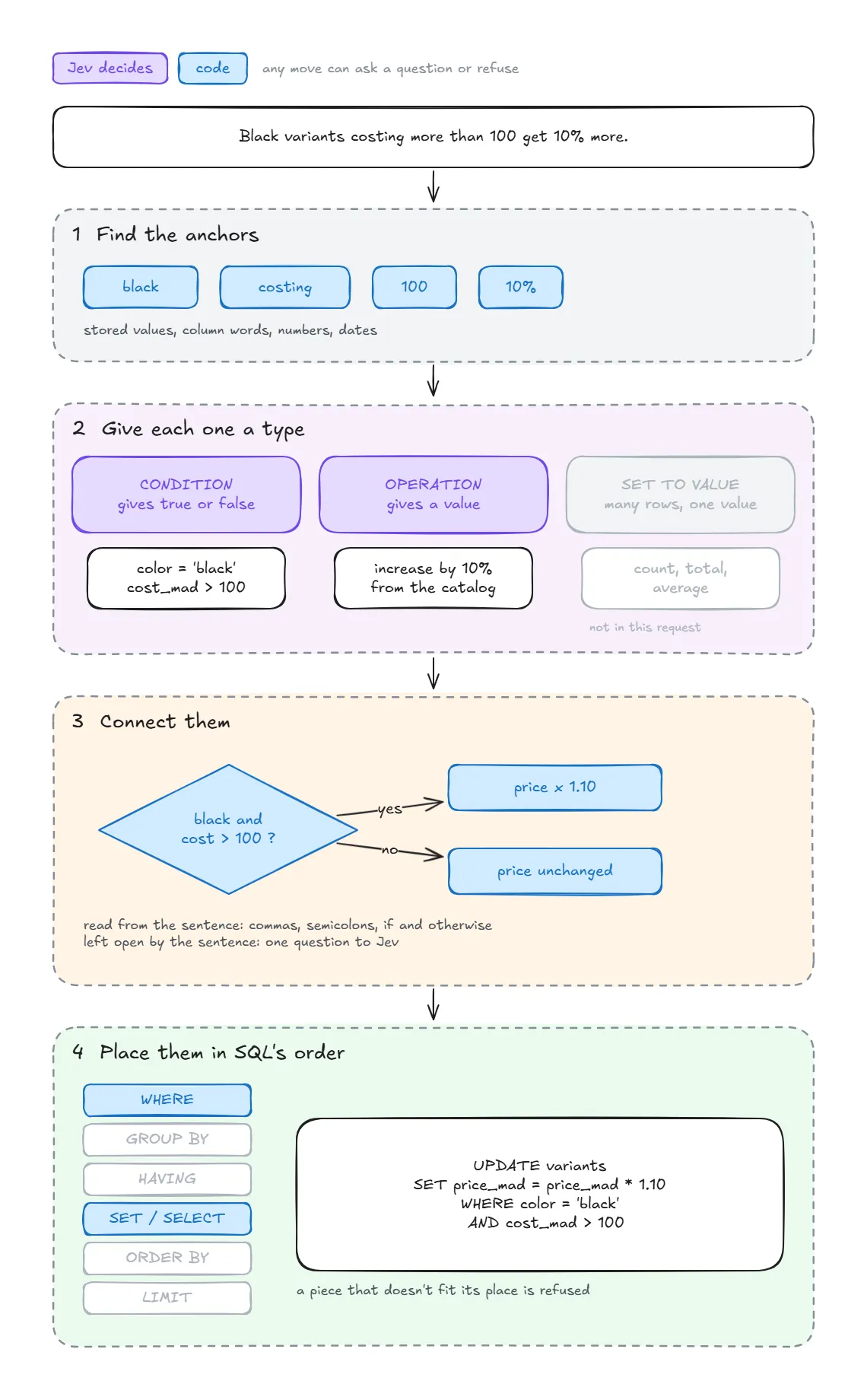
The three types of piece. Everything a request does is made of three kinds of piece:
- A condition compares two values and gives true or false:
color = 'black',cost_mad > 100. - An operation takes one or two values and gives a value: add 5, increase by 10%, round to the nearest 5. A longer computation is a chain of them: A + B + C is built as (A + B) + C.
- A set operation turns many rows into one value: a count, a total, an average, a maximum.
1. Finding the pieces. The pieces start from the request's anchors: its numbers, the stored values found in step 2, its dates and the words that name columns.
"Black variants costing more than 100 get 10% more."
Anchors: "black" (a stored colour), "costing" (names the cost), "100", "10%".
2. Giving each piece its type. Each anchor gets a short question with a closed list of answers, never an open one:
- A value or a column that chooses rows becomes a condition. "Black" becomes
color = 'black'. Is the cost used to choose the rows? Yes, so "costing more than 100" becomescost_mad > 100. - A number in a change becomes an operation. What does "10%" do? The answers offered are entries of a tested catalog, found by a search module: here, increase by a percent. No operation is ever written freely.
- A count, a total or an average becomes a set operation: "how many", "the average price".
3. Connecting the pieces. When a request has several conditions and operations, the pipeline must decide which operation applies to which rows. It reads this from the sentence's shape first: its commas and semicolons, its "if" and "otherwise".
"Black variants get 10 more, and white variants get 5 more."
Two clauses, each with one condition and one operation: black → +10, white → +5. Nothing to ask.
"For the white ones, add 15 if they cost more than 50, and 5 otherwise."
Inside the white variants: +15 for those costing more than 50, +5 for the others.
Jev is asked only where the sentence leaves the answer open, with one question per open point:
"Raise the black variants by 10% and lower the price by 5."
The 10% goes to the black variants, but the 5? Jev is asked: the black variants, or the others?
The connected pieces form one of three structures:
- A branch: a condition with two values, one for the rows that meet it and one for the others.
- An AND / OR tree of conditions: "black or navy, and under 100".
- A condition on groups: "colours with more than 2 variants".
4. Placing the pieces. Each piece's type decides where it goes in SQL's fixed order. A condition on rows goes to WHERE and a condition on groups to HAVING; then come GROUP BY, SELECT, ORDER BY and LIMIT. A piece whose type doesn't fit its place is rejected at this point. A branch, for example, must give a value, not true or false.
Step 4: Assembly
The last step makes one SQL statement per request and checks it. It asks Jev nothing: every decision was made earlier.
The ledger. Every number, date and stored value found in the request must be used by one of its pieces. If one is left over, the request is refused: it would otherwise run without one of its restrictions.
The SQL tree. The pieces are placed into a SQLGlot tree, each in its slot. A condition on another table follows the foreign keys as a chain of subqueries. A request that works on an earlier request's rows reads them in one of two ways: through that read's own conditions, or through the ids the earlier change returned.
Checks. Each statement is validated against the store's schema and then tried on SQLite, inside a savepoint that is rolled back, so nothing changes yet. A change that would touch every row of a table is asked first.
All or nothing. If one request of the message can't be built, none of the message runs.
The whole path, in short
"Raise the price of the black variants by 10%, then show the 3 most expensive ones."
- Requests: two requests, linked by THEN; "ones" points to "the black variants". R1 is a change (UPDATE), R2 a read (SELECT) of R1's rows.
- Matching: "black" is found in
variants.color, both requests work onvariants, and "price" and "expensive" nameprice_mad. - Operation: R1 has the condition
color = 'black'and the catalog entry increase by a percent with 10. R2 has a sort onprice_mad, descending, and a limit of 3. - Assembly: every number is used (10, 3), and both statements pass the checks. The program is (simplified):
UPDATE variants SET price_mad = price_mad * 1.1 WHERE color = 'black' RETURNING variant_id;
SELECT variant_id, price_mad FROM variants
WHERE variant_id IN (SELECT value FROM json_each(:rows_r1))
ORDER BY price_mad DESC LIMIT 3;
The session then runs the program: R1 in its own savepoint, so undo can take it back, and R2 on the rows R1 changed.
Operation catalog
Every computation the pipeline writes comes from a catalog, The catalog is a small SQLite database shipped with the tool. Each entry is one operation, such as decrease by a percent, round to a step, add a text at the start or average of the values.
What an entry holds
- A name and a behaviour, in plain words: "Replace each value with itself minus a percentage of it."
- A role: a condition (true or false), a value (a new value for each row), or an output (a value shown, such as a total).
- Typed parameters: for decrease by a percent, the number column changed and the percentage.
- Example requests, written the way people ask: "take 10% off the delivery fees", "cut every budget by 5 percent".
- Its distinctions from its neighbours: "unlike subtracting an amount, the decrease is proportional to each value".
- A builder: the code that writes the operation as a piece of the SQL tree.
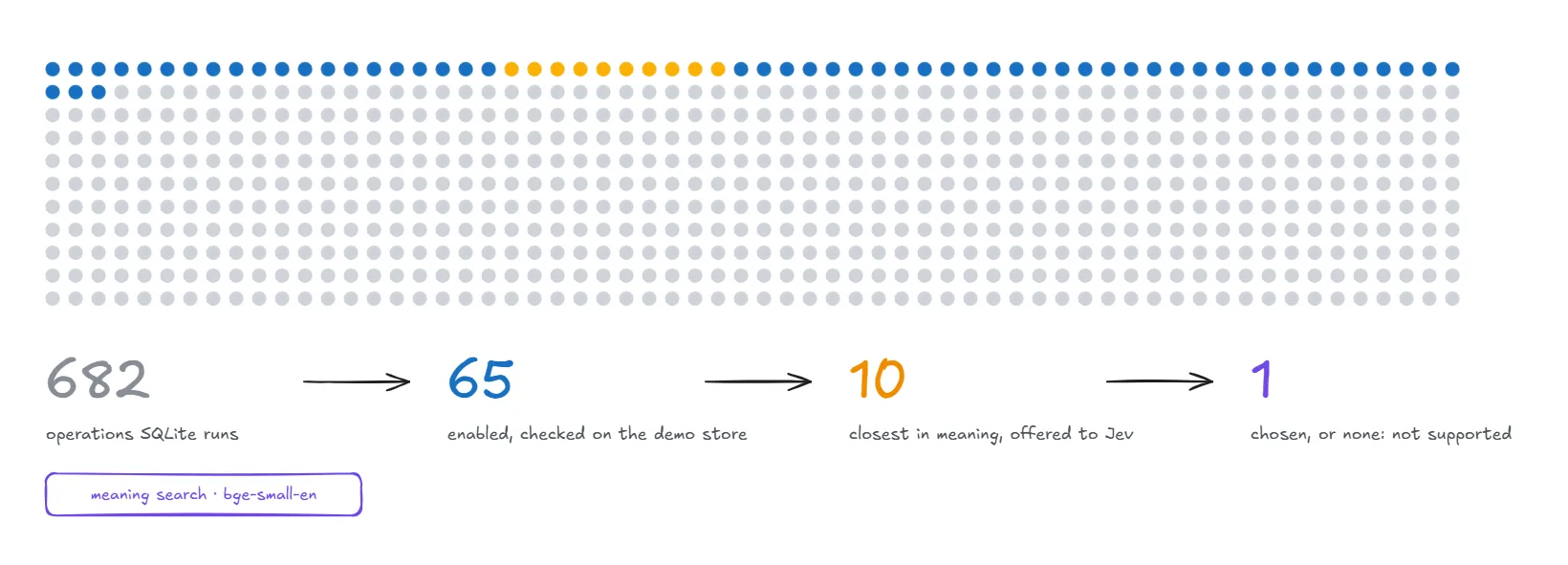
What is in it. The catalog holds 682 entries. 613 of them describe SQL functions as they are, and they stay disabled until an entry with examples and a builder is written for them. 65 are enabled today: 32 values, 18 conditions and 15 outputs.
How an operation is chosen
- Search: the request is compared by meaning (bge-small-en) with every enabled entry: its name, its behaviour and each of its examples. The ten closest entries are kept.
- Choice: Jev picks one of the ten, or none. None means the request is refused rather than built with the wrong operation.
- Parameters: the entry's parameters are filled from the request, each read by its type ("10%" → a percentage of 10).
- Builder: the entry's builder writes the SQL piece:
price_mad * 0.9.
Adding an operation. A new entry is enabled only after two checks: the search must find it from requests it has never seen, and its SQL must give the right result when run on the demo store. On held-out requests, the right entry is among the ten offered 98% of the time.
Table classification
When a store is imported, each CSV file goes through a series of classifications before any table is created. Each one adds a fact about the file or its columns, and later steps build on them.
What the import learns from each table:
- The header: whether the first row names the columns or is already data.
- The type of each column: integer, real number or text, and whether it can be empty. The type follows how the cells are written, not what they mean.
- The profile of each column, counted by code rather than guessed: how many cells are empty, how many values are distinct, how often a value repeats, and which other columns always follow it (a customer id always comes with the same customer name).
- The context of each column: whether it gives a unit or a currency for others, either in a column of its own ("currency") or in a header ("Weight (kg)"), and which columns it describes.
- The kind of each column: a reference to a record, a reference to a model, a name, an attribute (a colour, a size), contact details, or a plain value. The kind decides the column's role in identifying records.
- The keys: each table's primary key, and which columns point to another table's key (
variant_idin the sales file points to the variants). - Repeated records: groups of columns that repeat together inside one file, such as a customer's name and email on every order line. They are moved into a table of their own.
From these facts, code builds the schema. Every column's origin (its file, header and position) is kept beside the tables, so each file can be rebuilt as it was uploaded. Before anything is written, the import proves it: the rows are loaded into the new tables, every file is rebuilt from them and compared cell by cell. If one cell differs, nothing is written.
Guardrails
The guardrails are the checks that stand between a message and the store's data. Each one catches a different kind of mistake, at the point where it would appear, and each one ends the same way: the user is asked, or the request is refused with its reason. Nothing is ever approximated.
Before the pipeline runs
- Not a data request: a message such as "undo that" or "save my work" is stopped before any step, and the user is told which command does it.
- Structure changes: adding, renaming or removing a column or a table is refused for now.
While the request is built
- Sure or ask: every judgement comes with its probability. An answer that isn't sure enough becomes a question for the user instead of a guess.
- Look-alike columns: when two columns could be meant, such as a price and a cost in the same unit, the user chooses.
- Typed pieces: a piece that doesn't fit its place, or a computation that loops back on itself, is refused before anyone is asked.
- The ledger: every number, date and value the request writes must be used. One left over means the request would run without one of its restrictions, so it is refused.
Before anything runs
- Checked on SQLite: each statement is tried inside a savepoint that is rolled back, so a statement the store can't run is caught without changing anything.
- Every row: a change that would touch every record of a table is asked first.
- All or nothing: if one request of a message can't be built, none of the message runs.
After it runs
- Undo: every change can be taken back, one by one, until the session is saved.
- No save unasked: only the user's
exitor the closing of their terminal saves. An idle session or a crash saves nothing, and the journal restores the changes.
At import
- Proof by rebuilding: the new tables must rebuild every uploaded file cell by cell, or nothing is written.
07Database architecture.
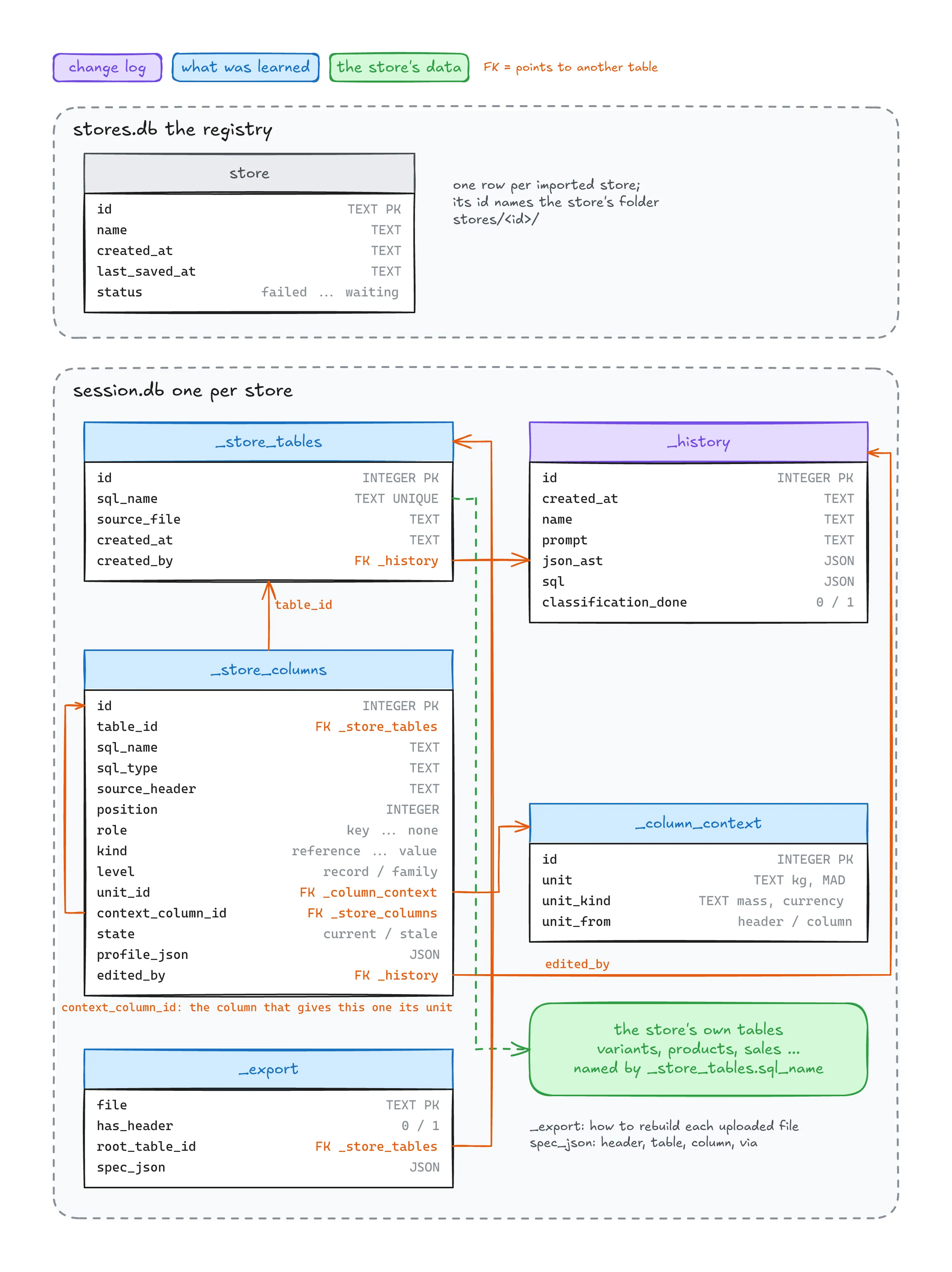
Each store lives in its own folder, and a small registry (stores.db) lists the imported stores. A store's folder holds:
files/: the uploaded CSV files, kept unchanged.session.db: the SQLite database the tool works on. It holds the store's tables with their rows, and, beside them, the tool's own tables, whose names start with_so they never mix with the store's:_store_tablesand_store_columns: where each table and column came from (its file, header and position) and what the import learned about it (its kind, its role, its unit);_export: how to rebuild each uploaded file from the tables;_history: every change made to the store, the import being the first one.
original.db: a copy of the database taken right after the import, never changed.import.json: the import's record: every answer, and every question asked and answered.
Two choices keep this simple:
- The store's data and its description live in the same file. A change and its record in the history are written in the same transaction, so they can't disagree.
- The uploaded files can always come back.
orbitrows exportrebuilds each file with the same name, encoding, delimiter and header as its upload, from the current tables.
SQL execution and versioning
The SQL is run by the session, the background process that holds the store open. It holds one transaction on session.db for the whole session, so nothing reaches the store's file until the session ends.
Running a message. A message's program runs in its own savepoint, a named point inside the transaction that can be rolled back to. Its statements run in order. When a later request works on the rows an earlier change touched, the change reports their ids, and the session passes them to the later statement. A program that changes nothing, such as a plain read or an update that matches no row, is rolled back at once: there is nothing to undo.
Undo. Each change keeps its savepoint open, so orbitrows undo rolls back to the last one. Undo can be repeated, change by change, back to the start of the session.
History. Every change is written in two places:
_historyin the database: the message, the SQL that ran and the tree it was built from. It is written inside the same savepoint, so an undone change leaves no record behind.- The journal on disk (
journal.jsonl): one line per change or undo, written to disk immediately.
Saving. The work is saved, in one commit, when the session ends on orbitrows exit, or when the terminal that started it closes. A session left idle too long ends without saving, so an interrupted agent's changes are never saved unasked.
Recovery. Changes that weren't saved, after an idle end or a crash, are not lost: the next session replays the journal, in order, each change in its own savepoint again, so undo still works on them. A change that can no longer be replayed is reported, along with every change after it.
08Agent skills.
OrbitRows is meant to be used mainly by AI agents. The CLI is shaped for that: every command prints one JSON object, and its exit code says what happened (0 done, 3 waiting for answers, 1 refused, with the reason).
An agent learns to use it from a skill file (skills/orbitrows/SKILL.md), a set of instructions the agent loads when the user asks about their store's data. Its rules keep the tool's safety intact when the agent sits between the user and the CLI:
- Check the status first. After a start or a resume, the agent tells the user which changes are not saved yet and which question is still waiting.
- Send the user's words. The agent passes the request as the user wrote it. It never translates it into SQL or into its own phrasing.
- Answer only what is settled. When the CLI asks a question, the agent answers it only when the user's own words or the store's data already settle it. It marks the answer as its own (
--by agent) and tells the user what it answered and why. Anything else goes to the user. The user can also choose to answer every question themselves. - A refusal is an answer. The agent explains the reason in plain words. It doesn't reword the request on its own until it passes.
- Saving is the user's decision. The agent never runs
orbitrows exitunless the user asks to save.
The skill also lists what an agent must never do: write or run SQL itself, open the database file, or hide a notice or a refusal from the user.
When the agent stops. An agent can stop at any time: the user interrupts it, it crashes, or its window is closed. The session doesn't stop with it, because it is a separate background process, and it never saves on the agent's behalf. The solution is simple:
- The session watches the terminal that started it. When that terminal closes, the user has left: the session saves and ends.
- If no command arrives for 30 minutes, the session ends without saving. An agent that was interrupted never has its changes saved unasked.
- Nothing is lost. The unsaved changes stay in the journal, and the next command restores them, with their undo. A question still waiting for an answer is kept too.
- The next agent picks up where the last one stopped.
orbitrows status(rule 1) shows the unsaved changes and the waiting question, so the agent can tell the user before doing anything else.
09Features and status.
36 delivered, 6 in demo and 4 in development, across 9 areas.
Import
- CSV import: encoding, delimiter, header detectionDelivered
- Column types and whether a column can be emptyDelivered
- Column profile (empty, distinct, repeats, dependencies)Delivered
- Units and currencies read from headers or their own columnsDelivered
- Column kinds and roles (references, names, attributes, values)Delivered
- Primary keys and references between tablesDelivered
- Repeated records moved into their own tableDelivered
- Proof by rebuilding every file before writingDelivered
- Import questions and resume (
orbitrows answer)Delivered - Export the files back as uploaded (
orbitrows export)Delivered
Supplier files
- Add a supplier file to a store (
orbitrows incoming)Demo - Update or add store records from a supplier file, by messageDemo
Messages
- Several requests in one message, linked by THEN / ANDDelivered
- Words that point back ("them", "their")Delivered
- Reads filtered by values, numbers, units and datesDelivered
- Negation and missing valuesDelivered
- AND / OR conditionsDelivered
- Conditions on linked tablesDelivered
- Totals, counts and averagesDelivered
- Sorting and top NDelivered
- Conditions on groups (HAVING)Demo
- Related records ("products without variants", "how many")Demo
- Updates with formulas (percent, amount, rounding, limits)Delivered
- Text changes (prefix, suffix, capitals, fill empty values)Demo
- DeletionsDelivered
- Additions (new or copied records)Demo
- Conditional changes (if / otherwise, branches)In development
- Swapping two columns' valuesIn development
Operation catalog
- Meaning search over the catalog, 65 enabled operationsDelivered
- The remaining 613 SQL functionsIn development
Session
- Background session with undo by savepointDelivered
- Journal and replay after a crash or an idle endDelivered
- Save on exit or terminal close; no save when idleDelivered
orbitrows status: unsaved changes and waiting questionsDelivered
Agents
- Agent skill file (
skills/orbitrows/SKILL.md)Delivered - Agent answers settled questions (
--by agent,ORBITROWS_ANSWERS)Delivered
Guardrails
- Sure or ask: an unsure answer becomes a questionDelivered
- Look-alike columns asked (price or cost)Delivered
- Ledger: every number and value must be usedDelivered
- Checked on SQLite before running; all or nothingDelivered
- A change to every row asked firstDelivered
- Non-data messages stopped with the right commandDelivered
Models
- Model client for Jev, swappable for another modelDelivered
- Alternative decision backends (d3-mini, GLiNER), branch decision-backendsIn development
Setup
orbitrows setup: Duckling in Docker and model downloadDelivered- Models preloaded, about 4 s per messageDelivered
10Benchmark.
What was measured
The benchmark asks one question: given a request in plain English about a store's data, does the system produce SQL that gives the right result? It compares three systems on the same requests:
- OrbitRows: the full pipeline with Jev; when it asked a question, the benchmark answered with its likeliest option
- Codex: Codex CLI 0.166.0 with the account's default model (
codex exec, read-only, a fresh empty folder per request) - Qwen 3 8B: run locally through Ollama, thinking on, temperature 0.6, 8k context
Codex and Qwen received the same prompt: the tables' CREATE TABLE statements, the values of the columns that hold few of them, today's date, and the request, with the instruction to answer with SQL only. Neither system saw the rows.
The test set
The set holds 700 requests about a demo store of six tables (categories, suppliers, products, variants, inventory, sales). They were generated from templates in 16 groups, such as values, numbers, units, dates, negation, missing values, linked tables, OR, totals, groups, ranking, updates, formulas and deletions. Each request comes with its expected answer, computed by SQL on the store:
- for a read, the expected rows, or the expected number or list;
- for a change, the expected state of every table afterwards.
Every request was checked before any run: a read must return at least one row, and a change must change something.
How answers were scored
Each system's SQL is run on a fresh copy of the store and compared with the expected answer:
- a read is right when one column of its last result holds exactly the expected keys (or the expected number or list);
- a change is right when every table ends exactly as expected.
Each answer then falls into one of five outcomes:
| Outcome | Meaning |
|---|---|
| Right | the result matches |
| Refused | no SQL was produced, and the system said why |
| Wrong after a question | wrong, but the system asked a question first (OrbitRows only) |
| Silently wrong | wrong, with no question and no warning |
| SQL error | the SQL doesn't run |
A refusal is safe: nothing runs, and the user knows why. A silent wrong answer is the dangerous outcome: the user believes a result that is false. So the silent-wrong count matters as much as the right count.
Results
OrbitRows and Codex, all 700 requests
| OrbitRows | Codex | |
|---|---|---|
| Right | 656 (93.7%) | 660 (94.3%) |
| Refused | 25 | 1 |
| Wrong after a question | 15 | 0 |
| Silently wrong | 4 | 39 |
| Questions asked | 236 | 0 |
| Median time | 3.6 s | 5.4 s |
The two systems are right about as often. They differ in how they fail. When Codex is wrong, it is silent, which happened 39 times. When OrbitRows can't be sure, it refuses or asks, and it was silently wrong 4 times.
All three systems, the first 319 requests
Qwen was run on the first 319 requests only. On those, the three systems compare as follows:
| OrbitRows | Codex | Qwen 3 8B | |
|---|---|---|---|
| Right | 304 (95.3%) | 290 (90.9%) | 244 (76.5%) |
| Refused | 8 | 1 | 0 |
| Silently wrong | 2 (+5 wrong after a question) | 28 | 72 |
| SQL error | 0 | 0 | 3 |
| Median time | 3.5 s | 5.7 s | 13.5 s |
By group
The groups show where each system is strong:
| Group | Requests | OrbitRows right | Codex right | Codex silently wrong |
|---|---|---|---|---|
| Negation ("not black") | 40 | 39 | 28 | 12 |
| Linked tables | 70 | 70 | 63 | 7 |
| Missing values | 27 | 24 | 20 | 7 |
| Updates | 63 | 63 | 60 | 3 |
| Numbers | 103 | 88 (9 refused) | 101 | 2 |
| Records ("with / without", "how many") | 33 | 17 (13 refused) | 32 | 1 |
| Groups ("more than 2 per colour") | 18 | 12 (3 refused) | 15 | 3 |
- OrbitRows is strongest where the store's meaning matters: empty values in a negation, conditions on linked tables, and updates.
- Codex is stronger where OrbitRows lacks a feature: requests about related records ("products without variants") and some groups. There, OrbitRows refuses rather than answers wrong.
Questions
OrbitRows asked at least one question on 164 of the 700 requests (236 questions in all). It was right on 523 of the 536 requests where it asked nothing.