 Skip to content


A WordPress plugin that helps website owners translate and manage multilingual content through an AI-assisted workspace, without creating duplicate posts.
LingoWP
Status
Launched · four agency clients
Period
29 May 2026 — 6 Oct 2026
Time invested
43 working days
Technologies
WordPress · React · FastAPI · PostgreSQL · FreeBSD
Website
lingowp.comCategory
Product · WordPress
Repository
aminesayagh/lingowpProgramming language
PHP · JavaScript · Python · Bash
- 01Overview and quick facts.
- 02The problem.
- 03Goal and scope.
- 04The solution.
- 05Architecture and tools.
- 06From content to a translation unit.
- 07Serving a translated page.
- 08Database architecture.
- 09AI translation and the cloud.
- 10Licences and accounts.
- 11How LingoWP compares.
- 12The AI translation queue.
- 13Designing the translation workspace.
- 14Features and status.
01Overview and quick facts.
More than four websites in ten run on WordPress: a local bakery, a hotel, a training centre, a shop with a few hundred products. Most of them are written in one language, but their visitors aren't. A tourist reading a hotel's page, or a customer abroad comparing prices, is someone the site could serve and doesn't.
Multilingual plugins have existed for years, and most of them solve the problem the same way: they copy the site. Every post, page, menu and category is cloned once per language, and each copy is translated on its own. It works on the first day. Then the original changes (a price, a paragraph, a new product), and every copy has to be found and changed by hand. Three languages means three sites to keep in step, and soon they aren't.
Then AI made translation itself cheap. A model can translate a page in seconds, well enough to publish after a review. But the words were never the hardest part. The hard part is everything around them: finding every piece of text a visitor reads, wherever it's stored; noticing when the original changes; and serving the right language without breaking the page. A faster translator doesn't help when half the text is never found.
LingoWP is built on that shift. It keeps one site and adds languages to it. The posts stay as they are, the single source of truth. LingoWP finds the text visitors see, stores each translation beside the original, and swaps it in when a visitor reads the site in another language. Whether a translation is written by hand or with AI, the site stays one site.
02The problem.
A website is never finished. Prices change, a new service is added, a paragraph is rewritten after a customer's question, and a seasonal offer comes and goes. Each change is small, and the owner makes it in minutes, in one place.
Add a second language the usual way, and no change is small anymore. The post now exists two or three times, and each copy has its own title, its own content and its own place in the menus and categories. Changing the original changes nothing else. Someone has to remember that the copies exist, find them, and redo the change in a language they may not read. When that person forgets, nothing warns them: the French page simply keeps last month's price.
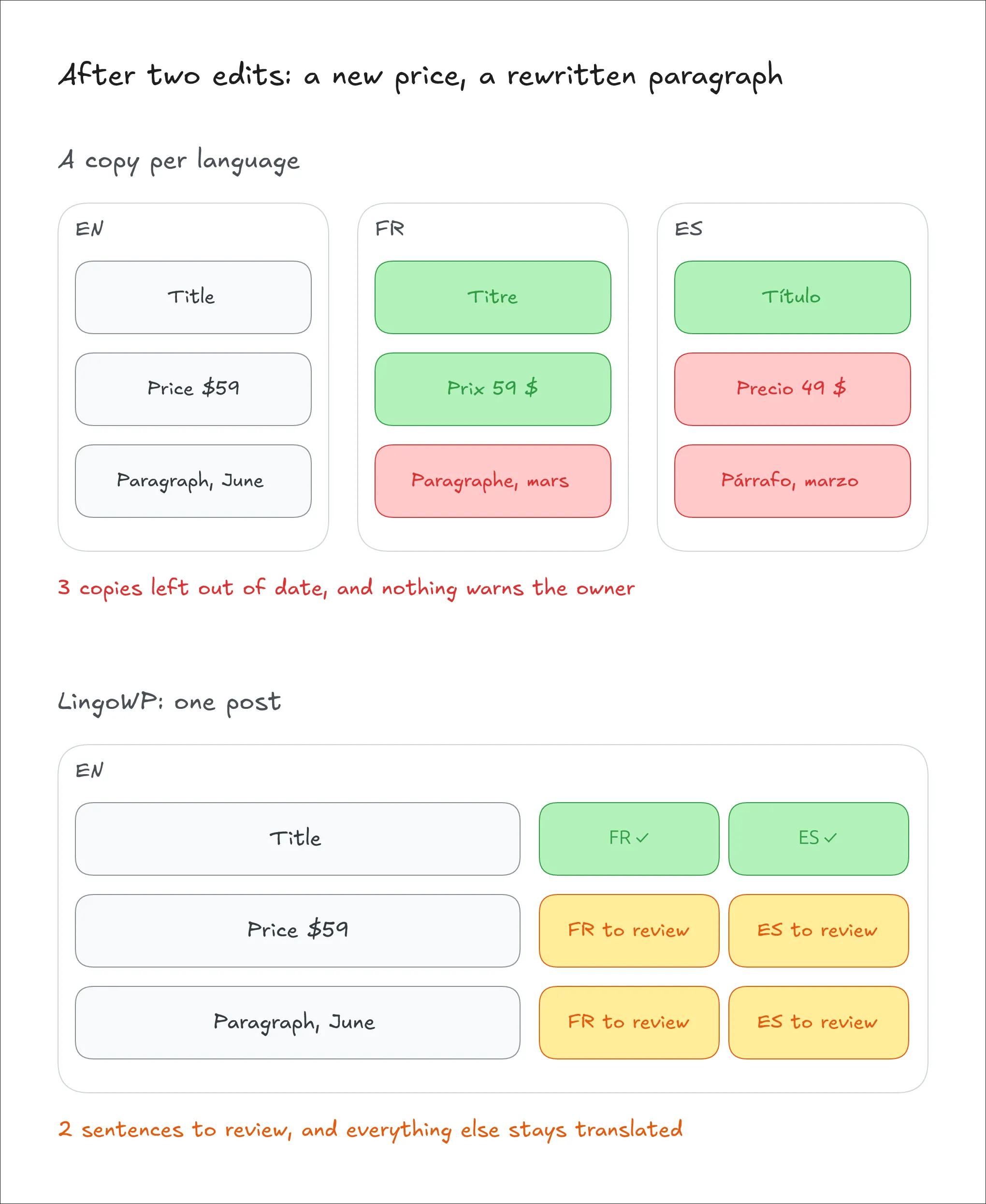
And the posts are only the visible part. The text a visitor reads is spread across dozens of places that WordPress keeps apart:
- the blocks of a page and the custom fields a theme adds;
- the widgets in a sidebar, the site's tagline, and the footer the theme prints;
- the buttons and messages of every plugin;
- a store's product attributes, and a page builder's own storage.
The owner never sees all of this as one list, so there is no way to know how much of the site is actually translated. A French visitor reads a French page with an English menu, an English cart button and an English footer.
The translation itself carries a risk too. A sentence on a web page is rarely plain text: it holds a link, a word in bold, or a shortcode that prints a form. A translator who drops a tag or mistypes a shortcode breaks the page. The break shows only to visitors of that language, and those are the pages the owner checks least.
So the real cost isn't the translation. It's everything around it: keeping the copies in step, finding text nobody listed, and protecting the page from its own translations. That work never ends, and it lands on the person with the least time for it.
The outcome is predictable. Some sites never add a second language, because the upkeep looks bigger than the gain. Others add one, and their translations decay quietly, page by page. A visitor who meets an outdated price or a half-English page trusts the site less than if it had stayed in one language.
AI translation doesn't close this gap. It makes the first translation faster, but it translates only what it's given. It can't find the text nobody listed, notice that the original has moved on, or stop a broken tag from reaching the page.
Closing the gap takes a site that stays one site. Its text is found for the owner, its translations know when they're out of date, and its pages can't be broken by them.
03Goal and scope.
The goal is simple: let a site owner add languages to their site without making a second site to look after.
Getting there meant saying no to a lot, on purpose. These are the lines we drew.
One post, never a copy
LingoWP never clones a post. The original post stays the only one, and each translation is stored next to it, tied to the sentence it translates. Menus, categories and links keep working as they are, because there is nothing new to link to.
That one choice removes most of the problem. An edit happens in one place. When a sentence of the original changes, only its translation is marked as out of date, and the rest of the page stays translated. When the original is deleted, its translations go with it.
Translate what a visitor sees, and nothing else
The rule is simple: if a normal visitor can read it, it is translated. If they can't, it isn't. Drafts, scheduled posts, private posts and content types that never appear on the site are left alone. A password-protected post is translated, because anyone with the password can read it.
The rule decides hard cases without debate, and it keeps the workload honest: the owner translates what visitors actually see. It also means translation starts once content is published, not while it is still a draft.
Web addresses follow the same thinking. A translated address, such as /fr/a-propos/ for /about/, is built from the page's translated title rather than added as one more thing to translate. It is off by default, because it changes every address on the site. The old address keeps working either way.
The owner shouldn't have to list the text
Many tools ask the owner to register each piece of text before it can be translated. Nobody knows their own site that well. A theme prints text in its footer, a plugin adds a button, and a page builder keeps its own copy of a heading.
So LingoWP finds the text itself: in posts, blocks, custom fields, categories, widgets, site settings, and the text themes and plugins print. Everything lands on one board, where the owner can see how much of the site is translated.
On the owner's server first; AI is optional
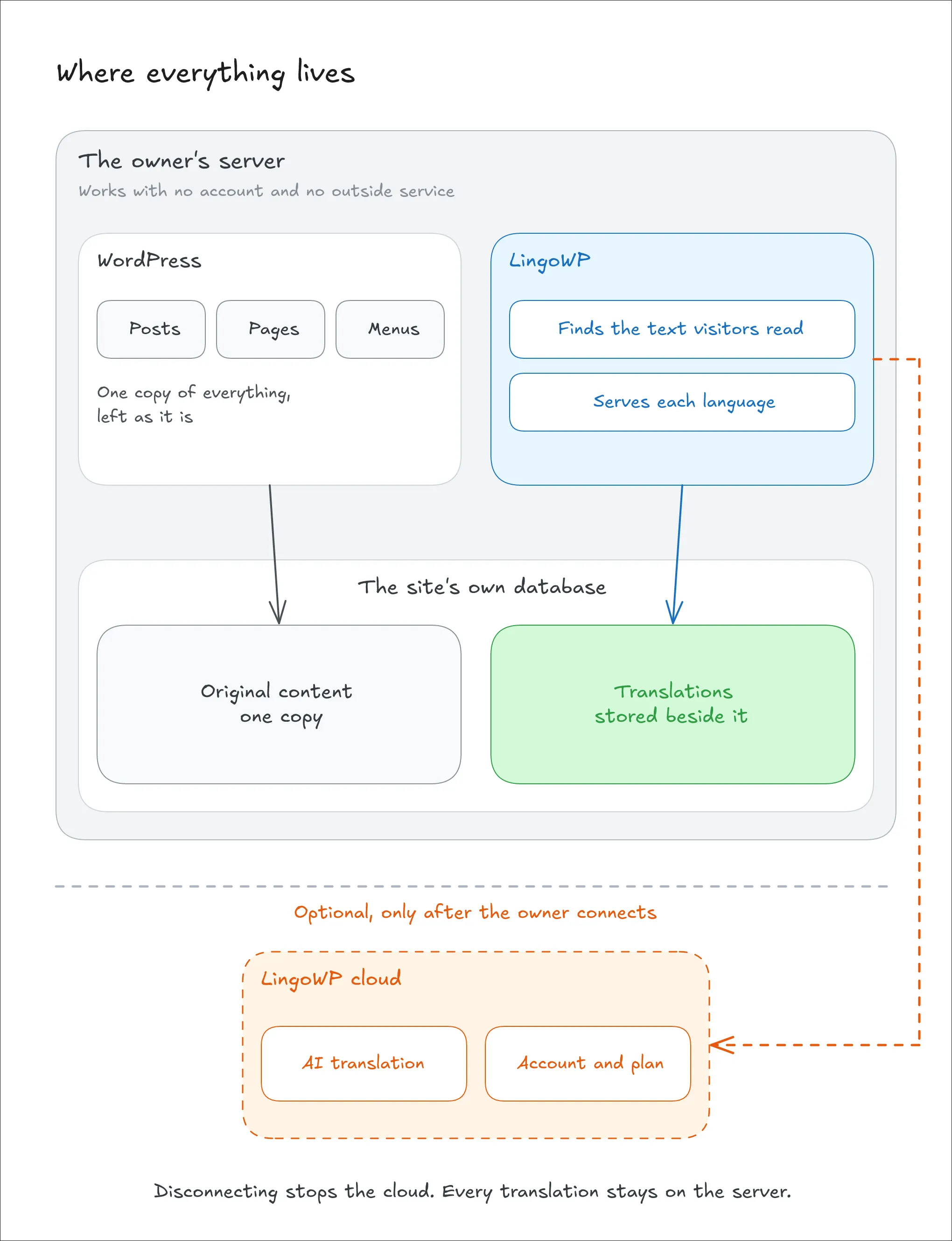
Everything that makes the site multilingual runs inside WordPress, on the owner's own server, with no account and no outside service. The translations live in the site's own database.
AI translation is offered through an optional connection to LingoWP's cloud. Nothing is sent anywhere until an administrator chooses to connect, and disconnecting leaves every translation in place. A site owner who never connects still has a complete multilingual site.
The page is rebuilt from the original
A translation is trusted with the words, not with the page. The links and formatting inside a sentence, and the shortcodes in it, are protected: the real tags are always put back from the original, and a translation that would break them is refused before it is saved (chapter 6). A broken page can't reach a visitor that way.
Other plugins through add-ons, not inside the core
WooCommerce, Elementor, Advanced Custom Fields and the main SEO plugins each store text in their own way. Support for each of them is a separate add-on built on public hooks, not code bundled into the core plugin. A site carries only the code it needs, and an add-on can follow its plugin's changes without a new release of LingoWP.
The limits of this version
These choices also set the boundaries:
- The same page in every language. A translation follows its original sentence by sentence. A page can't have an extra section, or a different layout, in one language only.
- Address prefixes stay in the source language. A translated address translates the page's own name, but a prefix that WordPress or a plugin adds stays as it is: a product page reads
/fr/product/….
04The solution.
The idea at its heart: the original stays the source, and every translation is attached to a piece of it. LingoWP finds the text a visitor reads, cuts it into small units, usually a sentence or a short field, and keeps one translation per unit and language. When a visitor asks for another language, the page is built as usual, and each unit is swapped for its translation on the way out.
What happens inside, from a post to a translated page
LingoWP has five big parts.
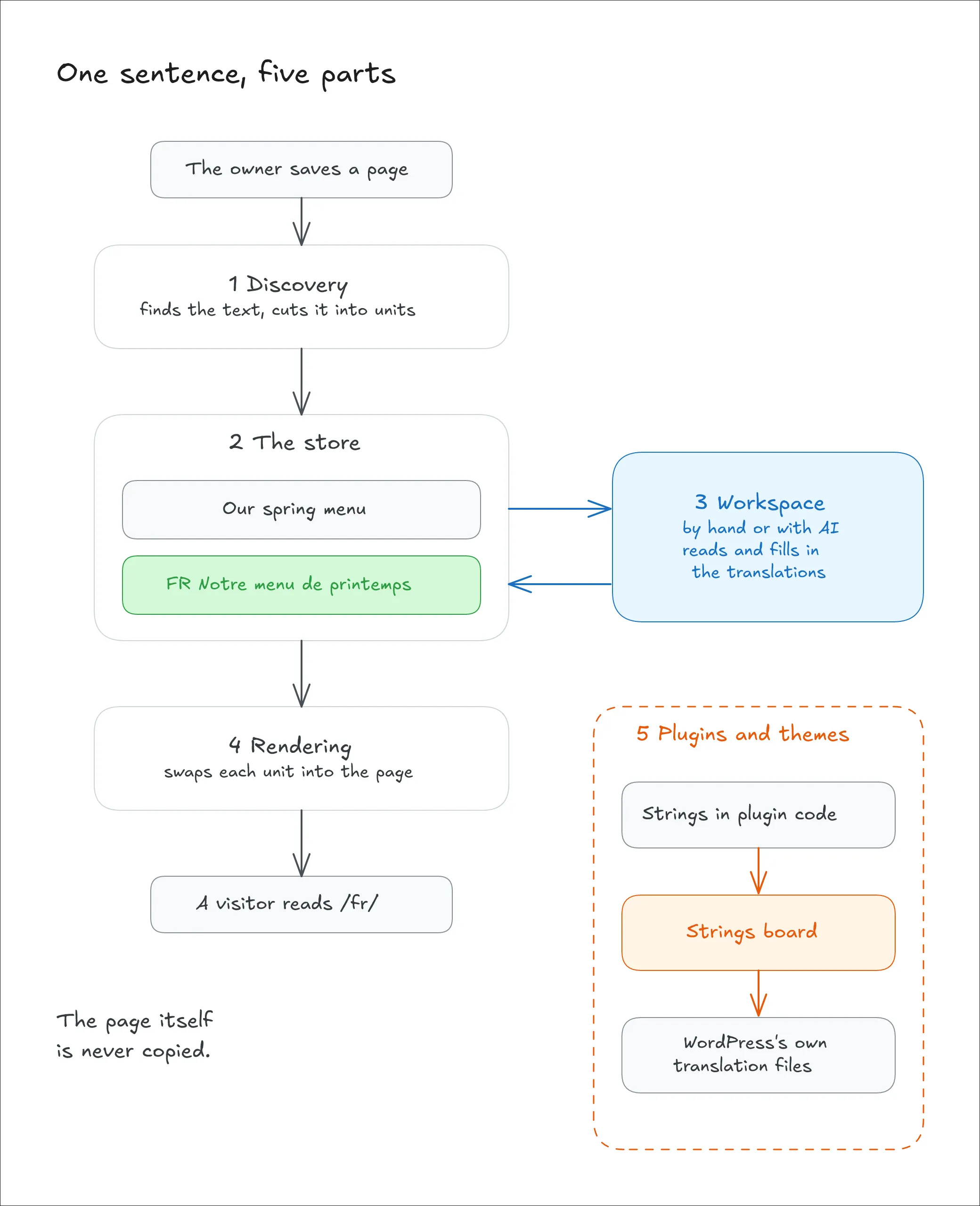
1. Discovery
Discovery runs whenever content is saved, and once over the whole site when LingoWP is installed. It reads each source of text in its own way: the blocks of a post, the fields of a category, the settings a widget keeps. It cuts the text into units and puts each one into the same plain form a visitor sees: curly quotes, dashes and paragraph breaks included.
2. The store
Each unit is kept in the plugin's own tables, keyed by its text and tied to where it was found. Its translations sit beside it, one per language. When the original text changes, the unit is replaced by a new one, and the old translation moves across to it marked as "needs review". Nothing is lost, and nothing out of date is shown as finished.
3. The workspace
The workspace is the admin side, where units are translated by hand or with AI (chapters 9 and 13). It shows what's done, what's waiting for review and what's missing. AI results arrive as "needs review", so a person still confirms each one.
4. Rendering
When a visitor reads the site in another language, WordPress builds the page as usual. LingoWP then reads the language from the address, swaps each unit for its translation, puts the real tags back in place of the markers, and keeps every internal link in the same language. A unit with no translation falls back to the next language in line, and to the original last.
5. Plugins and themes
Text that themes and plugins print through WordPress's own translation system has its own board. LingoWP scans each plugin for its strings, shows how much of each is translated, and writes the translations back as standard translation files, the ones WordPress already knows how to load. They never go into LingoWP's own tables.
05Architecture and tools.
LingoWP is a WordPress plugin, written in PHP, that makes a site multilingual without copying its content. It finds the text a visitor reads, keeps one translation per piece of text and language in its own tables, and swaps the translations in when a page is shown in another language. The admin side is a React application inside the WordPress dashboard. An optional cloud service, written in Python, adds AI translation and the account.
The plugin works inside WordPress rather than around it. It reads content through WordPress's own functions, translates it through WordPress's own filters, and finds out what a block or a route means from WordPress's own registries. When WordPress already knows the answer, LingoWP asks it instead of guessing.
The plugin is built in seven layers, and each layer has one job.
Admin interface
The admin interface is a single-page application inside the WordPress dashboard: the onboarding, the content board, the plugins-and-themes board, the editor, the languages, the switcher settings and the account. It talks to the plugin only through its own REST routes (lingowp/v1), so it never touches the database directly.
- React: the library the whole interface is written in, through the copy WordPress ships.
- TanStack Query: keeps the data from the server in a cache. Every read and write goes through it, and a saved translation refreshes the views it affects on its own.
- TanStack Virtual: draws only the rows on screen, so a board with thousands of units stays fast.
- Shopify Polaris: a ready-made set of admin components (buttons, tables, modals), so the interface looks consistent without a design system of its own.
- Tailwind CSS: utility classes for the layout around those components.
- Motion: small animations, such as the editor sliding in.
- nuqs: keeps the board's filters and page in the address, so a view can be reloaded or shared.
- @wordpress/scripts: WordPress's own build tool (webpack), which bundles the interface.
Discovery
Discovery finds the text and turns it into units (chapter 6): stored text when it is saved, and text a theme prints by visiting the site's public pages.
- WordPress's block parser and block registry: split a post into its blocks, and say which of a block's settings hold visible text.
- masterminds/html5: an HTML5 parser written in PHP. It reads the content of a block or a page the way a browser would, so a unit is cut at the right place.
- Action Scheduler: a background job queue for WordPress (the one WooCommerce uses). It runs the first full scan and the page visits in small batches, so no request times out.
Store
The store holds the units and their translations in the plugin's own tables, in the site's database (chapter 8).
- MySQL / MariaDB (InnoDB): the site's own database, with foreign keys tying each unit to its source.
Rendering
Rendering builds the translated page (chapter 7): most text through WordPress's own filters as the page is built, then one pass over the finished page for the theme's text and the links.
- WordPress filters and output buffer: where the translations are swapped in.
- masterminds/html5: the same parser as in discovery, used here to walk the finished page.
Languages and addresses
This layer decides which language a request is in, writes the addresses for each language, and places the language switcher (chapter 7).
- WordPress's rewrite rules: the routes a site already has, copied with a language prefix.
- Vite: a fast build tool that bundles the switcher's small script and style, separately from the admin.
- Floating UI: positions the switcher's dropdown so it stays on screen.
- flag-icons: a set of country flags shown next to the language names.
Plugin and theme strings
This layer handles the text that themes and plugins print through WordPress's own translation functions. It scans each plugin's code for its strings, keeps one row per string, and loads the translations from standard translation files.
- gettext/php-scanner: reads PHP source code and lists every string passed to a translation function.
- WordPress.org's translation API: gives the existing community translations for a plugin or theme, which LingoWP downloads on request and completes.
- PO and MO files: the standard translation file formats. PO files are imported and exported for translators, and MO files are what WordPress loads.
Cloud connection
The cloud connection is the only part that leaves the site, and only after an administrator connects. It sends the units chosen for AI translation, collects the results when the board refreshes, and handles the account, the plan and the add-on downloads.
- WordPress's HTTP API: every request to the cloud goes through it, so the site's own proxy and SSL settings apply.
The cloud service
The cloud service is a separate application. It runs the AI translation queue (chapter 12) and holds the accounts, the licences and the billing (chapter 10).
- Python and FastAPI: the language and the web framework the service is written in.
- PostgreSQL: the service's database, reached through SQLAlchemy, with schema changes managed by Alembic.
- Procrastinate: a job queue that runs on PostgreSQL itself, so translation jobs need no separate queue server.
- Translation models: an open model served by the platform by default. A site owner can bring their own OpenAI or Anthropic key instead, stored encrypted.
- FreeBSD: the operating system the service runs on in production.
06From content to a translation unit.
Content goes in, and translation units come out: small pieces of text, each with a stable key, ready to be translated once and shown everywhere they appear. Between the two are five steps. The first reads the sources, the second cuts them into units, the third puts each unit into one fixed form, the fourth protects what a translator must not break, and the fifth keeps the units in step with the site.
Each step follows one rule: discovery must see the text exactly as the visitor will. A unit found in a slightly different form from the one shown on the page is never matched, and its translation never appears. That failure is silent: the board says "done", and the page stays in the original language.
Step 1: Sources
A site's text lives in six kinds of places, and each one is read in its own way:
- Posts: the title, the excerpt and the content of every public post type, including pages, menu items, reusable blocks and the theme's template parts.
- Terms: the name and description of categories, tags and other taxonomies.
- Post fields and term fields: the custom fields a theme or a plugin attaches to a post or a term.
- Users: the author bio.
- Options: the site's title and tagline, classic widgets, and the theme's Customizer settings.
- Pages: text that a theme or plugin prints directly on the page, with no stored source at all.
Two rules decide what is read. The visibility rule from chapter 3 applies: drafts, private posts and hidden post types are skipped. And custom fields are read only from an allow-list. A field is translated only when it is known to hold visible text, because most fields hold settings, identifiers or numbers that would break if translated. The add-ons fill that list for the plugins they support.
Step 2: Cutting into units
A unit is the piece a translator works on: usually a paragraph, a heading, a list item or a short field. It is large enough to keep its meaning and word order, and small enough to be reused across pages.
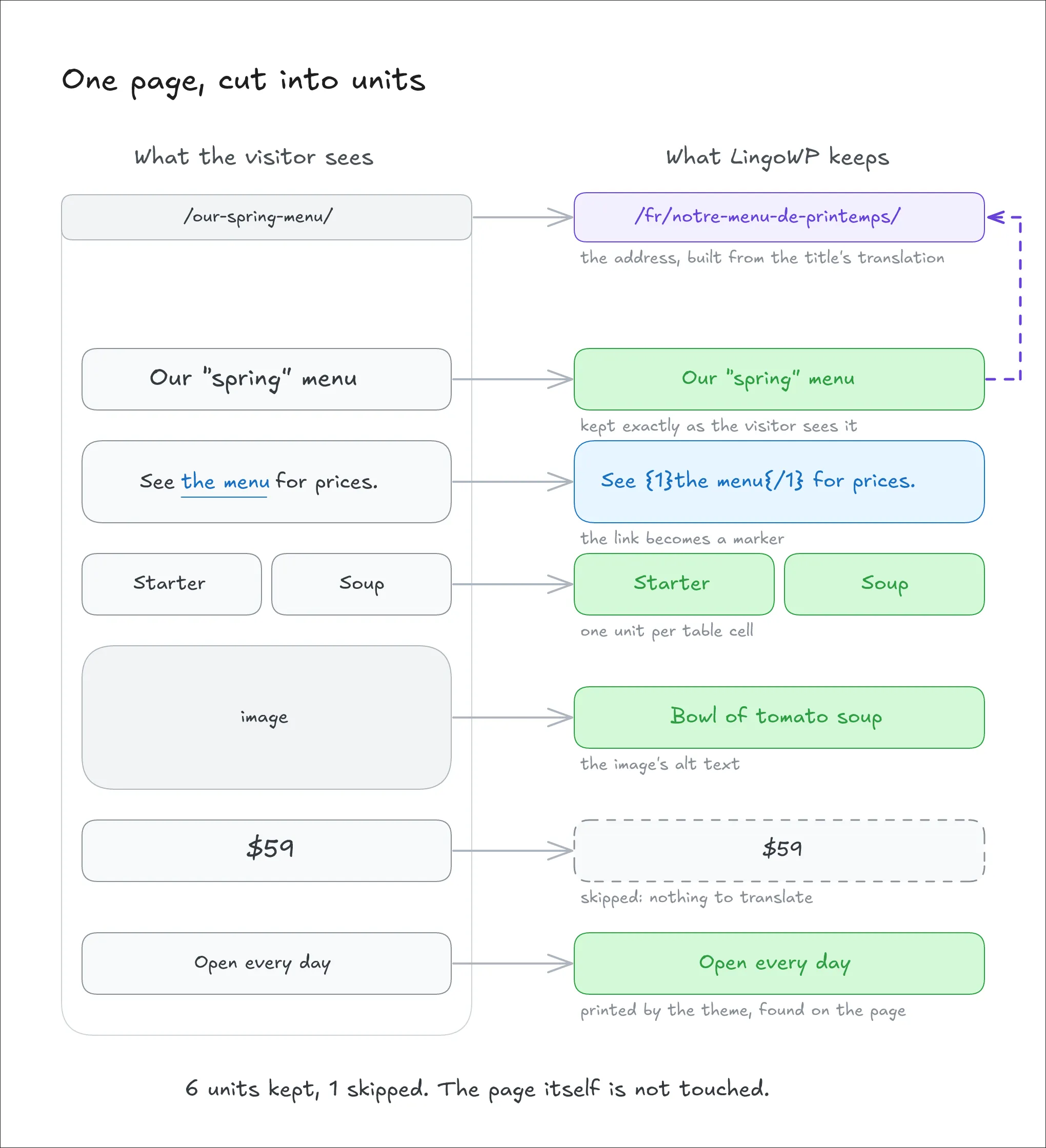
Post content is cut block by block. The parser walks the HTML and stops at each innermost block element: a paragraph, a heading, a list item, a table cell. That element becomes one unit, and everything inside it (links, bold text) stays part of the sentence.
<p>Book a <a href="/visit">visit</a> today.</p>→ one unit, not three.
Some elements needed their own rules, each found while testing real blocks:
- Tables: each cell is a unit. At first, a whole table came out as one unit, because the parser didn't look past
<thead>and<tbody>. - Quotes and details: a quote's citation and a details block's summary are units of their own. They were silently dropped at first, because their text sits next to a paragraph rather than inside one.
- Verse: a poem keeps its line breaks, so a translation keeps its lines.
- Code, forms and embeds: preformatted text, text areas, frames and drawings are never touched.
Attribute text is cut out too: an image's alternative text, a link's title, a field's placeholder and a button's label. A visitor using a screen reader hears the alt text, so it's visible text under the rule.
Block settings are the hardest case. Some blocks, such as Search, the Navigation link or Post Terms, keep their whole text inside their saved settings rather than in the page's HTML. The HTML parser never sees it. Instead of a list of known blocks, LingoWP asks WordPress's block registry: every block declares which of its settings hold content ("role": "content"), and only those are read.
Search block → its label, placeholder and button text become three units. Its width and layout settings are ignored.
Structured field values, such as a repeater with several rows or a value saved as JSON, are walked to their leaves. Each piece of text inside becomes its own unit, and the structure around it is kept.
Before a piece becomes a unit, one last check removes what has nothing to translate: text with no letter in it (numbers, dates, prices, phone numbers), and values that are entirely a web address, an email, a file name or a timestamp. A sentence that contains a web address is kept. The check is conservative on purpose: anything with a real word in it stays.
Step 3: Normalising
Each unit is put into one fixed form, in two layers.
What the visitor sees. WordPress changes some text before showing it. It turns straight quotes into curly ones and -- into a dash, and it wraps plain-text paragraphs in HTML. Discovery applies the same changes to titles and content first, so the unit holds the text as displayed, not as stored.
Stored:
Our "best" offer -- this week→ shown, and kept as the unit:Our “best” offer — this week.
This was learned the hard way. Before the fix, any title or paragraph with a quote or a dash showed as translated on the board but never changed on the page. Content written without the block editor didn't appear on the board at all, because it had no HTML around its paragraphs.
The key. From the displayed text, a key is computed for matching. The text is lowercased, HTML entities are decoded, and spaces and line breaks are collapsed. Then the result is hashed (SHA-256). Accents are kept on purpose: in French, "ou" (or) and "où" (where) are different words, and merging them would give one of them the wrong translation.
About us,About UsandAboutfollowed by a line break andus→ one key, one translation.
The key is a fixed contract. Discovery, rendering, the plugins-and-themes board and the cloud service all compute it the same way. The cloud's Python copy of the rules must match the plugin's byte for byte, or an AI translation can't find its way back to its unit.
Step 4: Protecting the page
A sentence on a web page holds more than words. Two kinds of structure are protected, each in its own way.
Inline tags become markers. Links, bold and italic text inside a unit are replaced by numbered markers, in the order they appear. The translator sees, and moves, the markers instead of the HTML:
<p>See <a href="/menu"><strong>our menu</strong></a> now</p>
→  See {1}{2}our menu{/2}{/1} now
→  Voir {1}{2}notre carte{/2}{/1} maintenant
When the page is shown, the real tags are put back from the original, with their addresses and attributes. A translation that drops a marker, adds one or crosses two is refused before it is saved. Attributes are not part of the key, so changing a link's address doesn't make its sentence look new.
Shortcodes are counted. A shortcode such as [contact-form-7 id="5"] stays in the text, because some shortcodes carry words of their own (a title="…") that the translator should be free to change. What must not change is which shortcodes are there. A translation that removes one or adds one is refused. Only shortcodes actually registered on the site are counted, so a reference like "see [1]" is never mistaken for one.
Both checks run at one single point that every translation passes through, whether it was typed by a person or returned by AI.
Step 5: Keeping the units in step
A site changes every day, and discovery follows it.
On save. Each source has its own WordPress hook: after a post is saved, with its fields and terms; when a term is created or edited; when a field or a user's bio changes; when a widget or a Customizer setting is saved. Attachments needed their own hooks, because WordPress doesn't fire the usual "post saved" hook for them. Until that was found, image titles and captions were never discovered on any site.
When the original changes. The old unit is replaced by a new one with the new text and key. Its translation is carried across and marked "needs review": still shown, but flagged on the board. Units that didn't change keep their translation as it is.
Text with no stored source. Text printed by the theme is found on the finished page, by a background job that visits every public address. Text that already belongs to a post or a field is skipped there, so the same sentence is never registered twice.
The whole path, in short
A page titled
Our "spring" menu, with the paragraphSee <a href="/menu">the menu</a> for prices.
- Sources: the page is published and public, so its title and content are read.
- Cutting: the title is one unit, and the paragraph is another.
- Normalising: the title becomes
Our “spring” menu, as the visitor sees it. Each unit gets its key. - Protecting: the paragraph is stored as
See {1}the menu{/1} for prices. - Keeping in step: the owner later changes "prices" to "today's prices". The paragraph gets a new unit, the French translation moves across as "needs review", and the title keeps its translation untouched.
07Serving a translated page.
A visitor asks for /fr/a-propos/, and a French page comes back: the same page as /about/, with its text, its links, its dates and its tags all in French. Nothing about the page was copied. Between the request and the answer are five steps. The first reads the request, the second builds the page in the visitor's language, the third finishes it, the fourth tells search engines about it, and the fifth lets the visitor change language.
One rule runs through all of them: WordPress stays in charge. LingoWP never changes WordPress's own language, never builds a page itself, and never keeps a second set of routes. It gives WordPress a request it can understand, and translates the page WordPress builds.
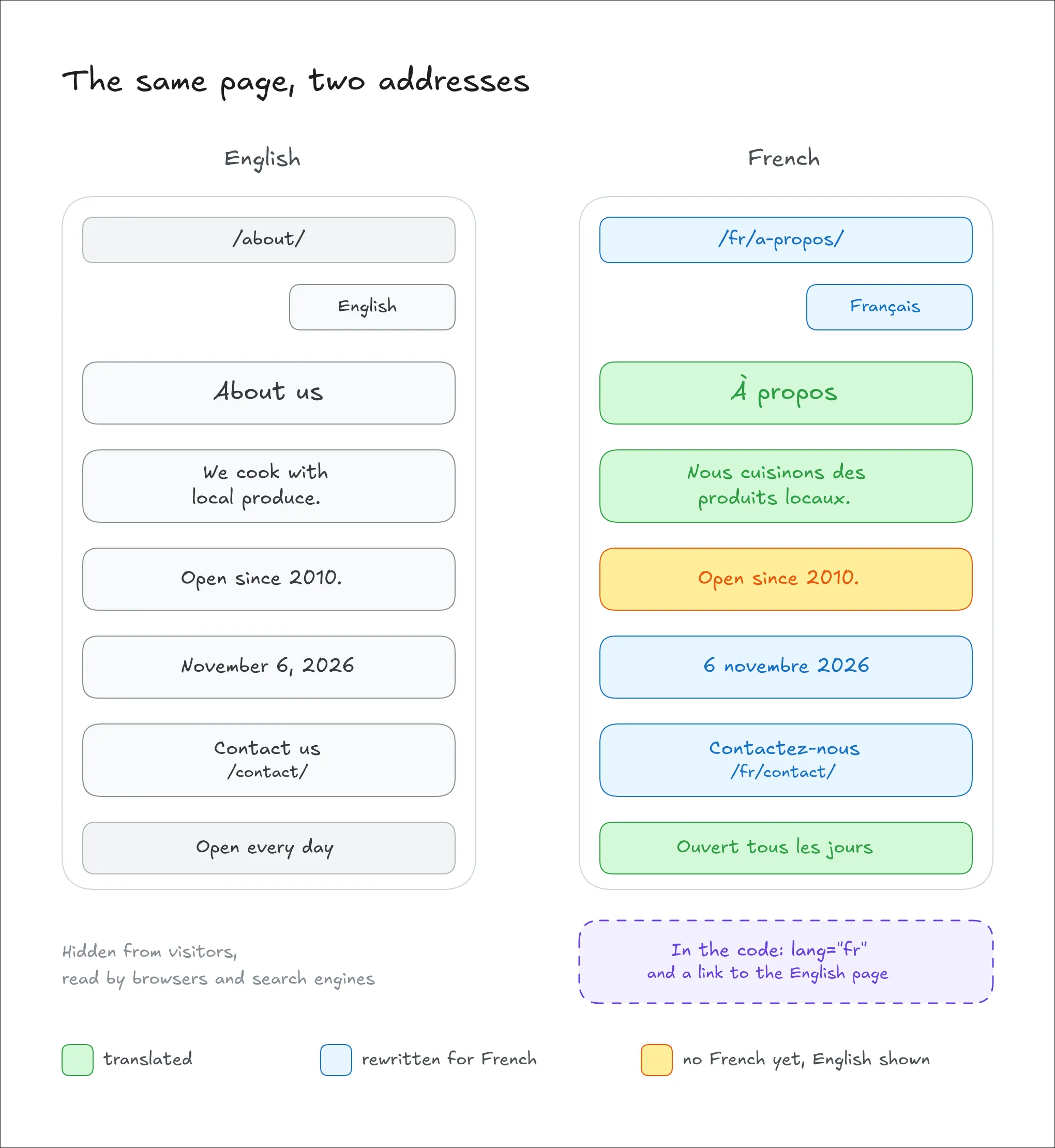
Step 1: Reading the request
The language prefix. Every route a site already has (pages, posts, archives, a shop's account pages) gets a copy that starts with a language prefix. /fr/about/ follows exactly the same rule as /about/, with the language attached. By default, the site's own language keeps its addresses without a prefix, and the owner can give it one too.
The translated address. When translated addresses are on, /fr/a-propos/ has to become /about/ again before WordPress can find the page. That happens at the very start of the request, before WordPress reads the address at all. Doing it later, on the route WordPress had already matched, failed in two ways during testing: a page was sent to a post's query and returned "not found", and a custom content type could resolve to an unrelated post.
Which part of an address is a name. Only the parts that name a page, a post or a term are translated. A fixed part, such as author or product, never is. That answer comes from WordPress's own rewrite rules, which say which part of each address feeds which name. A first version used a list of protected words instead. It failed: a page called john that translated to jean made /fr/author/jean/ show John's posts.
/fr/a-propos/equipe/→/about/team/, read in French. The old address/fr/about/team/still works, and the page's canonical address is the translated one.
Which language. The language is decided by a short chain, and the first answer wins:
- a language prefix in the address;
- an address with no prefix, which is the default language;
- the visitor's saved choice, from a cookie, when the owner turns this on;
- the browser's language, when the owner turns this on;
- the site's default language.
The address always wins. /fr/about/ is French, even when the cookie says Spanish. The cookie and the browser only help on a first visit to an address without a choice in it.
Sites in a folder. A WordPress site installed at /blog/ gets /blog/fr/about/, never /fr/blog/about/. One piece of code owns that rule, so every address the plugin writes or reads agrees on it.
Step 2: Building the page in the visitor's language
WordPress builds the page as it always does. As each piece of text passes through its usual filter (a title, a post's content, a field, a category name), LingoWP replaces it with its translation.
Fast by design. Translations are loaded in one batch for all the posts a page shows, never one query per sentence. Most text is matched by its key, computed from the text the filter already holds. A custom field is matched by its place instead: the post and the field name. When a field holds several pieces of text, such as a repeater's rows, each translated piece is put back into a copy of the value, and the rest stays as it was.
Block settings. Text kept in a block's settings, such as a search button's label, is translated just before that block is drawn, through the filter WordPress fires for every block.
When a translation is missing. Each language names a fallback. By default, it's another variant of the same language when the site has one, so Canadian French falls back to French, and otherwise it's the original. A sentence with no translation in either is shown in the original. A half-translated page is never shown with gaps.
Dates and numbers. WordPress writes dates and numbers in the site's own language, whatever page is shown. LingoWP formats them again in the visitor's language: month and day names, and decimal and thousands separators. For a shop's prices, only the number is reformatted. The currency symbol and its place stay as the store set them. Dates are caught at WordPress's lowest-level date function, because a block theme's date block calls it directly and skips the usual template filters. On block themes, dates stayed in the original language until this was found.
The page's language. The page's lang attribute is set to the visitor's language, and its direction to right-to-left for languages such as Arabic and Hebrew. Without this, a French page would announce itself as English to browsers, screen readers and search engines.
Step 3: Finishing the page
The finished page then passes once through an output buffer before it is sent. Two things happen there.
The theme's own text. Text printed by the theme or a plugin, with no stored source, is swapped for its translation, block by block, together with attribute text such as image descriptions.
Links. Every internal link on the page is rewritten into the visitor's language, prefix and translated name included, so a visitor who clicks around stays in French. WordPress's own redirects get the same treatment: when WordPress sends a visitor from an old address to a new one, or adds a missing slash, the language prefix is kept.
Fail open. If the page can't be read, it is sent as it is. A page in the wrong language is a problem, but a broken page is a worse one.
Step 4: Telling search engines
A translated page is only useful if people can find it.
- Language alternates. Each page lists its address in every language (
hreflang), plus a default for visitors whose language isn't offered. These addresses are built by the same code as the switcher and the links, so they always agree. - Untranslated pages stay out of search results. A page with nothing translated yet in the visitor's language is marked "noindex", so search engines don't list an English page under a French address. One translated unit is enough to lift it. When an SEO plugin has already decided for that page, its decision wins.
- A sitemap per language. WordPress's built-in sitemap gets a list of addresses for each published language, with untranslated pages left out by the same rule.
Step 5: Changing language
The language switcher is how a visitor moves between languages. It reads every address from one place, the same list that feeds the language alternates, so the switcher and the search engines never disagree about where a page lives in another language.
- Three shapes: a dropdown, a list, or inline links, placed with a shortcode, a template function, or as a floating button in a corner of the screen. A theme that wants its own design can read the list of language links directly and draw it itself.
- Plain links: each language is an ordinary link to the same page in that language. A small script remembers the choice in a cookie, and nothing depends on it.
- Clear labels: each language is written in its own name ("Français"). A region is added only when two variants of the same language are listed: "Français" and "Français (Canada)".
- Accessible: the current language is plain text, not a link. A short label such as "FR-CA" is read out in full to screen readers.
- Styled from the dashboard: colours, borders, sizes and the dropdown's shadow are set in the admin with a live preview of the real switcher, and saved as CSS variables so a theme can still override them.
Where it runs
The same rules hold on a site installed in a folder and on a multisite network. When the plugin is activated for a whole network, each site gets its own tables, settings and first scan. A site added later is set up on its own, and a deleted site takes its tables with it.
The whole path, in short
A French visitor opens
/fr/a-propos/on a site whose source language is English.
- Reading the request: the prefix says French, and
a-proposis read back toabout. WordPress receives/about/and finds the page. - Building the page: the title and paragraphs are swapped for their French translations as WordPress prints them. One paragraph has no French translation and is shown in English. The publication date reads "6 novembre 2026".
- Finishing the page: the footer text the theme prints is swapped for French, and a link to
/contact/becomes/fr/contact/. - Search engines: the page lists its English and French addresses, and is open to indexing because it has French content.
- Changing language: the switcher shows "Français" as the current language, with a link to "English" pointing to
/about/.
08Database architecture.
LingoWP keeps its data in the site's own database, next to WordPress's tables, in tables of its own. They answer three questions: which text the site holds, where each piece was found, and what its translation is in each language. The languages themselves, the switcher's design and the plugin's settings are ordinary WordPress options.
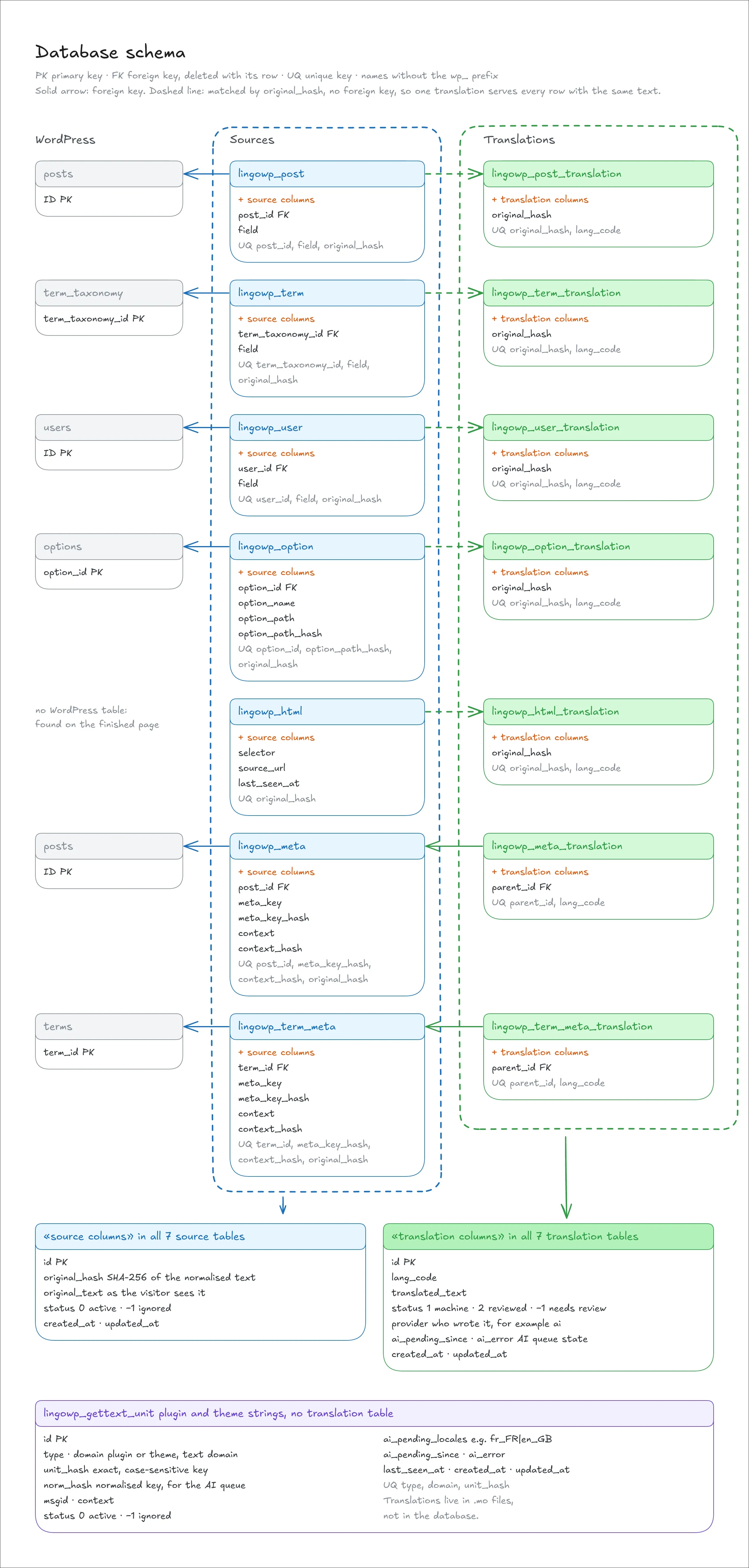
Sources and translations
The tables come in pairs: a source table that records the text found and where it was found, and a translation table that holds its translations, one row per language.
There are seven pairs, one per kind of source:
- posts: a post's title, excerpt and each unit of its content;
- post fields: the allow-listed custom fields of a post, down to each piece of a structured value;
- terms: a category's or tag's name and description;
- term fields: the allow-listed custom fields of a term;
- users: the author bio;
- options: the site's title and tagline, widgets and Customizer settings;
- pages: the text a theme or a plugin prints, found on the finished page.
A source row holds the original text as it is displayed, its key (the SHA-256 of the normalised text, from chapter 6), its place (the post and field, the term, the option and the path inside it), and a status: active or ignored.
A translation row holds the translated text, its language, a status (machine-translated, reviewed, or needs review), and where it came from, so an AI translation can be told apart from one typed by a person.
Two ways to tie a translation to its text
Most translations are shared by key. A translation row for posts, terms, users, options or pages is identified by the text's key and the language, with no link to any one source row. The same sentence on forty pages is forty source rows and one translation. That is what makes "translate once" real.
Custom fields are the exception. A translation row for a post field or a term field belongs to its source row. The same words in two fields can need different translations, so the translation is tied to the place, not to the text.
Following WordPress's own data
Every source table is tied to the WordPress table it reads from, with a foreign key. A foreign key is a rule kept by the database itself: a row can't point to something that doesn't exist. When a post, a term, a user or an option is deleted in WordPress, the database deletes its source rows in the same moment, and the translations of its fields with them. No code has to remember to do it.
Shared translations can't follow the same rule. A translation used by forty posts must not disappear when one of them is deleted. It should go only when the last one is gone, and a foreign key can't count. So a background sweep does it instead: it removes a shared translation once no source row holds its key anymore. The same sweep collects the translations left behind when a text is edited: the old translation is carried across to the new text as "needs review" (chapter 6), and its old copy is no longer used by anything.
Trash isn't deletion. A post in the trash keeps its rows, untouched. The board simply doesn't count them while the post is offline. When the post is restored, it comes back with every translation in place.
Changing the site's source language
A site's source language can change, for example when an English site is rewritten in French. Each source row already holds the text in the old language, so LingoWP copies it in one pass into a translation under that language's code. The old content stays on the site as a translation, ready to be served as one.
09AI translation and the cloud.
AI is the optional half of LingoWP. Everything in the earlier chapters works without it: finding the text, translating by hand, serving each language. AI makes the translating faster. It never decides on its own what a visitor reads: every AI translation waits for a person to confirm it.
Connecting is a choice
Nothing leaves the site until an administrator decides it should. During setup, the choice is shown plainly: connect to LingoWP's cloud, or continue without connecting. The same choice stays available later, from the workspace or the account page.
Disconnecting is one button away, on the account page. It stops every request to the cloud and leaves every translation where it is, because the translations always lived on the site.
What AI translates
AI works on the same units as a person, and in three sizes:
- One text: a single unit, from the board or the editor.
- A collection: everything missing in one group on the board, such as a single post with its fields, the site's settings, the media library, or the text the theme prints.
- A whole language: everything still missing for that language across the site.
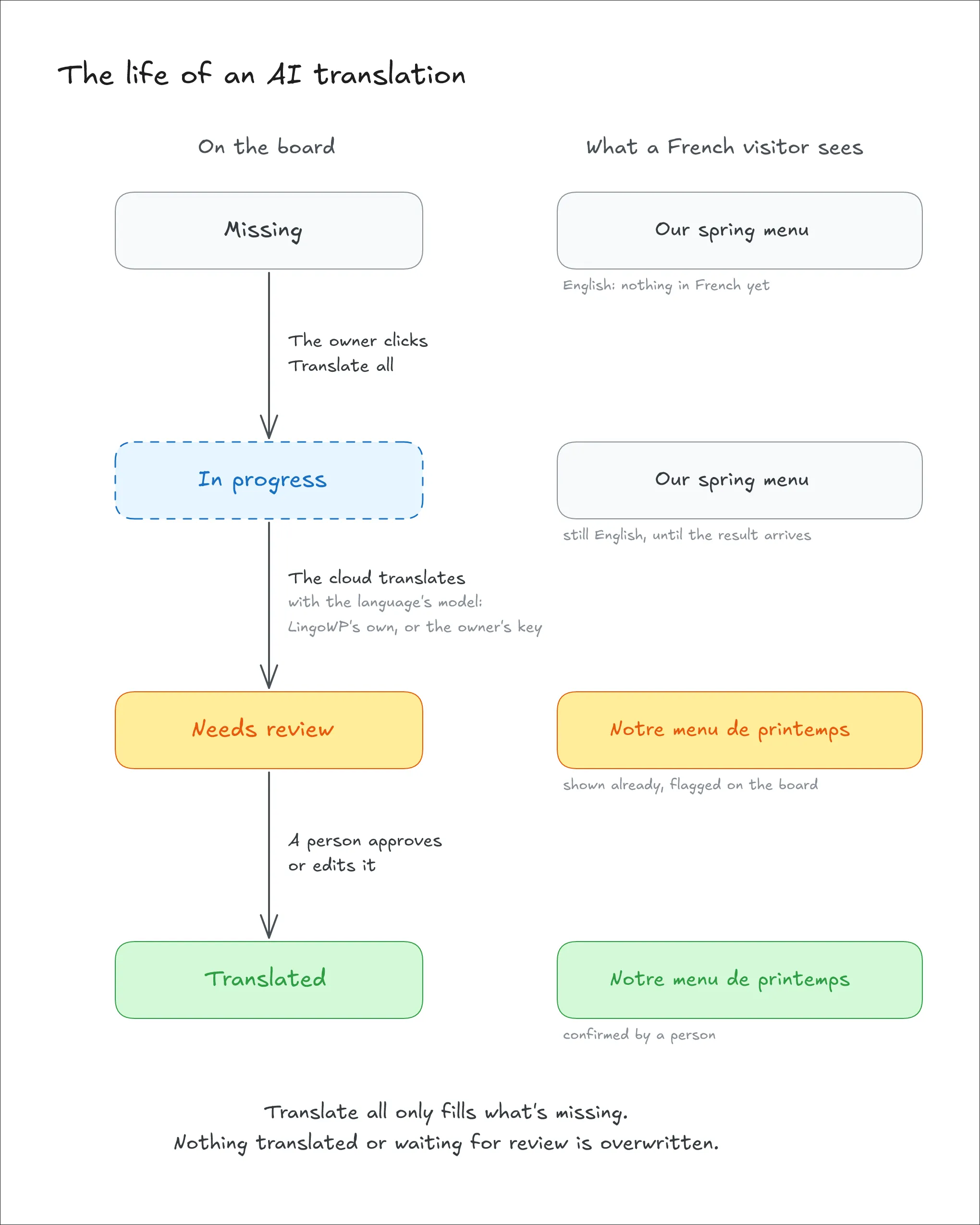
The two larger sizes translate only what's missing. A unit that already has a translation is left alone, even one waiting for review, so a click on "translate all" never overwrites a person's work.
Translating one text again. When a single text is sent to AI again, its current translation goes with it, and the model is asked for a different wording. Without this, the same text gave the same answer every time, because the model is set to give the same output for the same input, and the owner paid for a translation they already had.
In the background
A request doesn't wait for the AI to finish. The site hands the units to LingoWP's cloud and returns at once, and the board shows them as "in progress". The cloud translates them in small batches, protecting the markers, placeholders and links inside each sentence, and holds the results until the site collects them (chapter 12). When the results reach the site, they pass the same check as a translation typed by a person, and a result that fails is refused.
Always reviewed
An AI translation is saved as "needs review". It is shown to visitors, since a reviewed-later translation is better than none, but the board counts it apart from the confirmed ones. A person confirms it, edits it, or sends it back to AI. The owner always knows how much of the site a person has actually checked.
Choosing the model
Each language can use one of two kinds of model:
- LingoWP's own model, included in the plan.
- The owner's own key, for OpenAI or Anthropic. The key is checked with the provider and stored encrypted in the cloud. Requests still pass through LingoWP's cloud, which uses the key to call the provider on the owner's account.
Each language can also have a writing style: a short instruction, such as "formal, use vous" or "friendly, short sentences", sent with every request for that language. One button applies the same model and style to all languages.
Privacy
The cloud receives only what it needs for each request: the chosen text, its source and target languages, and the identifiers needed to send each result back to its place. The text sent for translation isn't used to train or improve models.
10Licences and accounts.
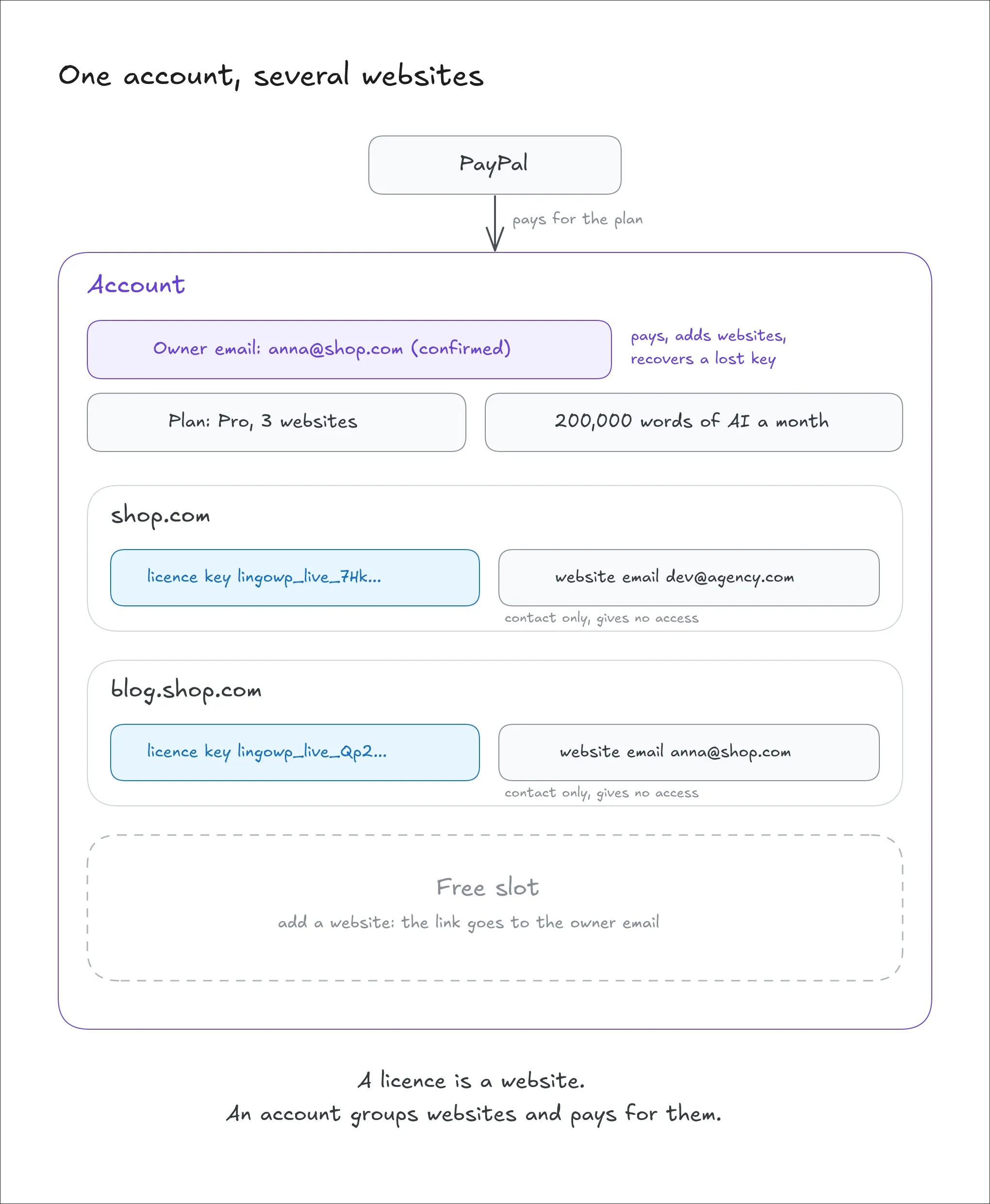
LingoWP's paid side rests on two ideas. A licence is a website: each connected website holds its own licence key, and that key alone says which website it is. An account groups websites: it holds the subscription, the word balance and the owner's email, and it can hold as many websites as its plan allows.
There is no user name and no password stored in WordPress, and no check that ties a key to a domain. The licence system lives entirely in the cloud. The plugin only holds its key, and nothing in the plugin's own code is locked behind a plan: every local feature works the same on every site. A plan only changes what the cloud does for the site.
Two emails, two roles
Two different emails appear in the system, and they don't do the same job:
- The website email is the administrator's email, sent when a website connects. Each website has its own. It is contact information only: it can be changed freely, and it gives no access to anything.
- The owner email belongs to the account. It is set only after its owner clicks a confirmation link, and one email can be the owner of only one account. It is the email that pays, adds websites and recovers the account when a key is lost.
Keeping them apart means a website can be handed to a developer or an agency, with their own email on it, without giving them control of the account that pays for it.
Connecting a website
When an administrator connects a website, the plugin sends the website's domain and the website email. The cloud creates the website with a new licence key, and an account for it: a new, empty one, with no plan and no owner yet. The key goes back to the plugin, which stores it in WordPress's options, never loaded on public pages and never sent to the browser.
The cloud keeps only a fingerprint of the key (a SHA-256 hash), never the key itself, so a leak of the cloud's database doesn't reveal any working key. Each request from the plugin carries the key, and the cloud finds the website by its fingerprint.
Connecting never blocks and never waits for an email. A new install always gets a working licence in one step. The domain is checked only for basic sense: it must be a real domain that answers, not localhost, a local test name or a bare IP address.
Why the key isn't tied to a domain
A site's address changes more often than it seems: a staging copy, a move to a new host, a domain bought later. A key bound to a domain would break on each of those, and a broken licence on a live shop is worse than a loose one.
So the domain is kept only as contact information. When the plugin loads its status, the cloud returns the domain it has on file. If it differs from the site's own address, the plugin updates it. A website that moves simply tells the cloud where it is now.
Claiming the account
A new account has no owner. From any of its websites, the administrator can enter an owner email, and the cloud sends a confirmation link to it. The email becomes the account's owner only once the link is clicked. If that email already owns another account, the request is refused.
One account, several websites
A plan covers a number of websites: one, three or ten. Only an account with a confirmed owner can add more. From a website that is already connected, the owner enters the new domain and that website's own email, and the cloud sends a confirmation link to the owner email. Once it's clicked, the new website gets its own licence key, inside the same account, sharing its plan and its word balance.
A website belongs to one account at a time: a domain already connected in another account can't be added. An add request that is waiting for its confirmation already holds a slot, so several requests sent at once can't push the account past its plan.
When an account still ends up with more websites than its plan allows, for example after a downgrade, the newest websites are the ones over the limit. They keep working normally, with every local feature and their settings, but the cloud refuses hosted AI for them until the owner removes a website or upgrades. Nothing is stored to mark them: the count is made again on each request, so freeing a slot lets a website back in at once.
Losing a key
A key can be lost: a site rebuilt from scratch, a database restored from an old backup, a plugin reinstalled. Connecting again always gives the website a new, working licence in a new empty account, so it is never stuck.
If the website email it connects with is also the confirmed owner email of an existing account, the cloud emails that owner a reclaim link. Clicking it moves the website into the owner's account, with its plan and its word balance, and the empty account created a moment earlier is deleted. The website keeps the key it was just given. The reclaim offer is a bonus, never a condition: if the email fails or is rate-limited, the website still has its working licence.
Three ways a site can lose access
The cloud tells the plugin, with a distinct answer, which of three things happened:
- Detached: the key is still valid, but the website isn't attached to any account. The plugin keeps the key and shows a notice. The website can be attached again.
- Revoked: the key is dead, for example after a compromise. The plugin forgets it and connects again, which gives a fresh licence key.
- Unknown key: the cloud doesn't recognise it. The plugin connects again in the same way.
The plugin heals itself in each case. No owner has to open a support ticket because a key went bad. A key can also be replaced on purpose: one button issues a new key for the same site, and the old one stops working at once.
Plans and words
Plans are paid through PayPal, monthly or yearly. They differ in the words of hosted AI translation included each month and in the number of sites:
| Plan | Words per month | Sites | Monthly | Yearly |
|---|---|---|---|---|
| Free | none | 1 | — | — |
| Starter | 50,000 | 1 | $9 | $90 |
| Pro | 200,000 | 3 | $19 | $190 |
| Agency | 1,000,000 | 10 | $59 | $590 |
Word packs (50,000, 200,000 or 1,000,000 words) can be bought once, on top of a plan, and don't expire at the end of the month. A request uses the month's allowance first, then the packs.
Only LingoWP's own AI model uses words. A translation made with the owner's own OpenAI or Anthropic key costs nothing on LingoWP's side, and a translation typed by a person never reaches the cloud at all.
What a cancellation means. A cancelled or suspended subscription keeps the access already paid for until the end of its period. It stops the next renewal, not the current month. A yearly plan's months are prepared when it starts, but each month's allowance only counts once its month begins. A change of plan takes effect at the next renewal.
How words are counted. Only the words a visitor would read count, with the HTML around them ignored. The same count is used for the estimate before a request and for the amount used after it, so the two never disagree. Large requests reserve their words first, so two requests at once can't spend the same balance twice. The dashboard shows what's left.
How it was delivered
The cloud service runs on a FreeBSD server: the API (FastAPI, behind nginx, on a local socket) and a separate worker process that runs the AI translation queue. Both are kept running by FreeBSD's process supervisor, which restarts them if they stop.
Releases go out with one script, in eight steps:
- Copy the code to the server.
- Write the production settings, readable only by the service's user.
- Install the Python packages.
- Check that the application starts at all, before touching anything live.
- Apply the database migrations.
- Create the job queue's tables if they don't exist yet.
- Stop the old processes, and make sure none survived.
- Start the new API and worker.
A second script checks the service's health from the outside in: the server, the processes, the socket, the database, and finally the public domain. It runs every check even when one fails, so one pass shows the whole picture. Plugin and add-on downloads are sent on their own, with no restart, since they are read from disk on each request.
11How LingoWP compares.
Three other multilingual plugins were installed and studied on the same development site: Polylang (3.9.1), TranslatePress (3.3.7) and PerfLocale (1.0.7). Each was read from its own code and documentation, not from marketing pages. WPML, the oldest paid option, works on the same principle as Polylang and PerfLocale, and Polylang ships a tool to migrate from it.
The plugins differ less in their feature lists than in one early choice: where a translation lives. Everything else follows from it.
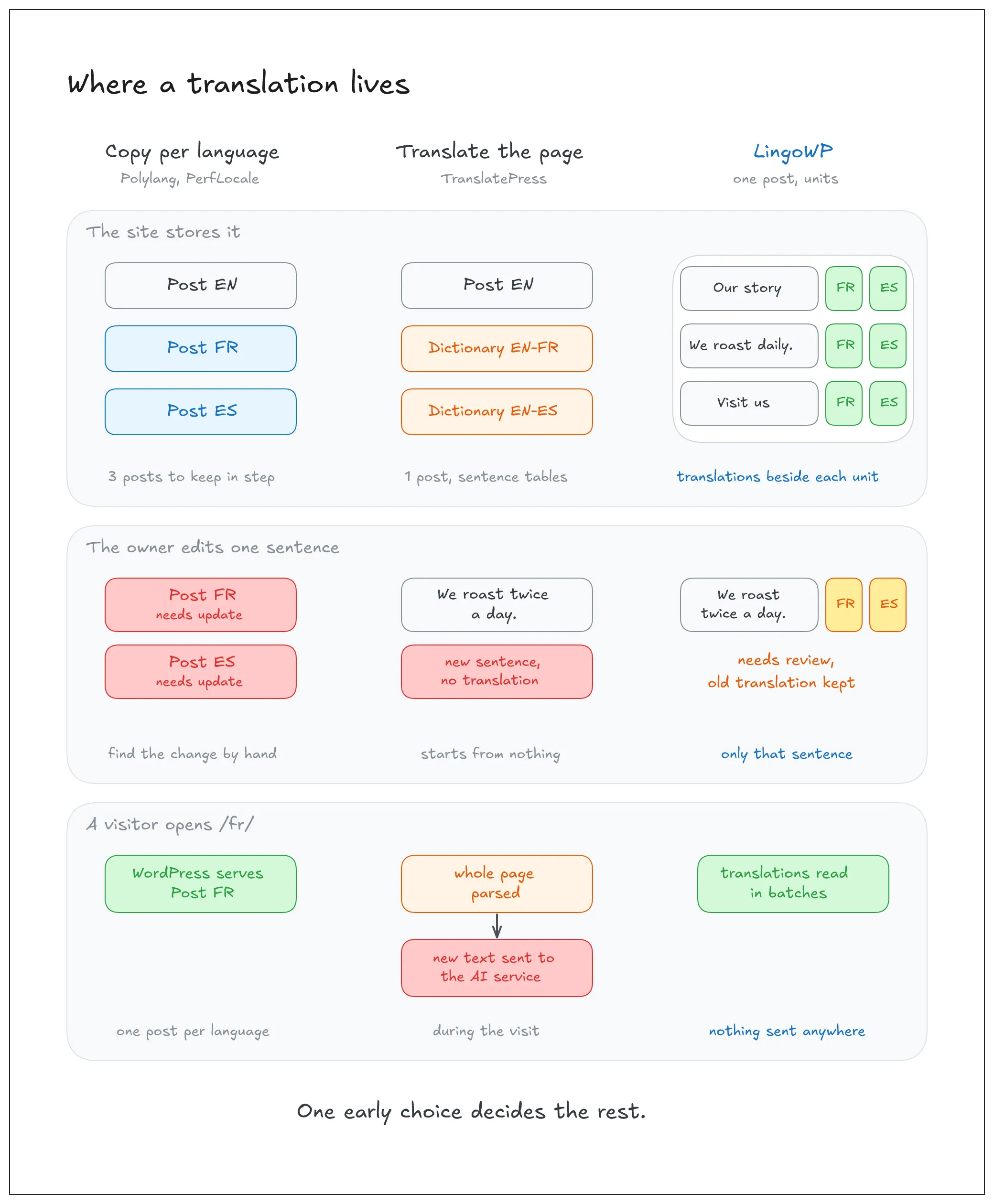
Three ways to make a site multilingual
One copy per language: Polylang and PerfLocale. Each translation is a separate WordPress post, linked to the original. Polylang links them with a hidden taxonomy, and PerfLocale with translation groups. This is close to how WordPress already works, so themes and plugins understand it, and each language can have its own layout. The cost is the one described in chapter 2: three languages means three posts to keep in step. PerfLocale notices when the original changes, but at the level of the whole post: the translation is flagged "needs update", and the translator has to find what changed.
Translate the finished page: TranslatePress. The site stays one site. On every visit in another language, TranslatePress reads the finished HTML page, looks up each sentence in a dictionary (one table per language pair), and swaps it. Anything a page shows can be translated, from any theme or plugin, and the visual editor lets the owner click a sentence on the page and translate it there. The cost is that the whole page is parsed on each visit. And when automatic translation is on, a sentence met for the first time on a visit is sent to the translation service during that visit: the plugin's own readme says requests "may be triggered by front-end page visits, not just admin actions".
One site, with units found at the source: LingoWP. The site stays one site, as with TranslatePress. But most text is found where it is stored, when it is saved, and translated through WordPress's own filters as the page is built (chapters 6 and 7). Only the text a theme prints is handled on the finished page. Nothing is translated during a visit, and nothing is sent anywhere unless the owner asks for AI.
Side by side
| Polylang | TranslatePress | PerfLocale | LingoWP | |
|---|---|---|---|---|
| Where a translation lives | a separate post per language | a sentence dictionary per language pair | a separate post per language | units beside the original, one post |
| When the original changes | each copy is edited by hand | the changed sentence becomes a new, untranslated one | the whole translation is flagged "needs update" | only the changed sentence is flagged; its old translation is kept for review |
| Text found automatically | posts and terms; other strings registered | everything on the rendered page | posts, terms, chosen blocks and strings | posts, blocks, fields, widgets, settings, theme text |
| Plugin and theme strings | only strings registered for it | yes | yes, with plural forms | yes, with WordPress.org packs to start from |
| Markup protected in a translation | n/a (full post editor) | merged into translation blocks | placeholders for machine translation | markers and shortcodes checked on every save |
| Machine translation | DeepL in Pro | its own AI (2,000 free words), Google, DeepL in Pro | DeepL, Google, Microsoft, LibreTranslate, WordPress AI | its own model, or the owner's OpenAI or Anthropic key |
| Reviewing machine output | n/a | shown live at once, marked as automatic | status tracking | every AI result saved as "needs review" |
| Languages in the free version | unlimited | one extra language | unlimited | unlimited |
| Translated addresses | Pro | SEO Pack (paid) | yes | yes, from the title translation |
| Account needed | no | no, except for its AI | no | no, except for AI |
Where LingoWP is ahead
- One post, at sentence level. It's the only one of the four that keeps one post and tracks change sentence by sentence. Copy-based plugins track the post. TranslatePress keeps one post but has no link between an edited sentence and its old translation, so the edited version starts from nothing.
- Nothing happens during a visit. Translations are looked up in batches as WordPress builds the page. No sentence is sent to a translation service because a visitor opened a page, so costs and privacy stay under the owner's control.
- The text is found for the owner. Polylang asks for strings to be registered, and PerfLocale makes synced patterns, navigation and templates opt-in. LingoWP reads blocks, block settings, fields, widgets, settings and the theme's own text without being told where to look (chapter 6).
- A translation can't break the page. Inline tags become markers, and shortcodes are counted. Both checks run on every save, whether a person or AI wrote the translation.
- AI never publishes on its own authority. Every AI result arrives as "needs review", and "translate all" never overwrites a person's work (chapter 9).
- Nothing local is behind a paywall. Every language, translated addresses and the plugins-and-themes board are in the free plugin. TranslatePress keeps a second language and its SEO features for paying users, and Polylang keeps translated addresses and machine translation for Pro.
In short
The plugins built on copies are close to WordPress, but they turn every edit into several. The plugin that translates the finished page keeps one site, but it pays for it on every visit, and it can send text out without anyone asking. LingoWP keeps one site, does its work when content is saved rather than when it is viewed, and treats every change, by a person or by AI, at the level of a single sentence. For a business owner who edits their site often and wants to know exactly what is translated, that's the difference that matters.
12The AI translation queue.
When an owner clicks "translate all", hundreds or thousands of units leave the site at once. The model can't translate them in one go, the site can't wait for it, and the owner's words must be counted exactly. The queue sits between the two: it takes the request at once, translates it in small batches in the background, and holds the results until the site comes to collect them.
It runs inside LingoWP's cloud, on the same PostgreSQL database as everything else, through Procrastinate (chapter 5), so it needs no separate queue server. The work is done by a worker process kept apart from the API: the API runs four copies of itself to answer requests, and a queue loop inside it would run four times. The queue works in five steps: submitting, claiming, translating, saving, and collecting.
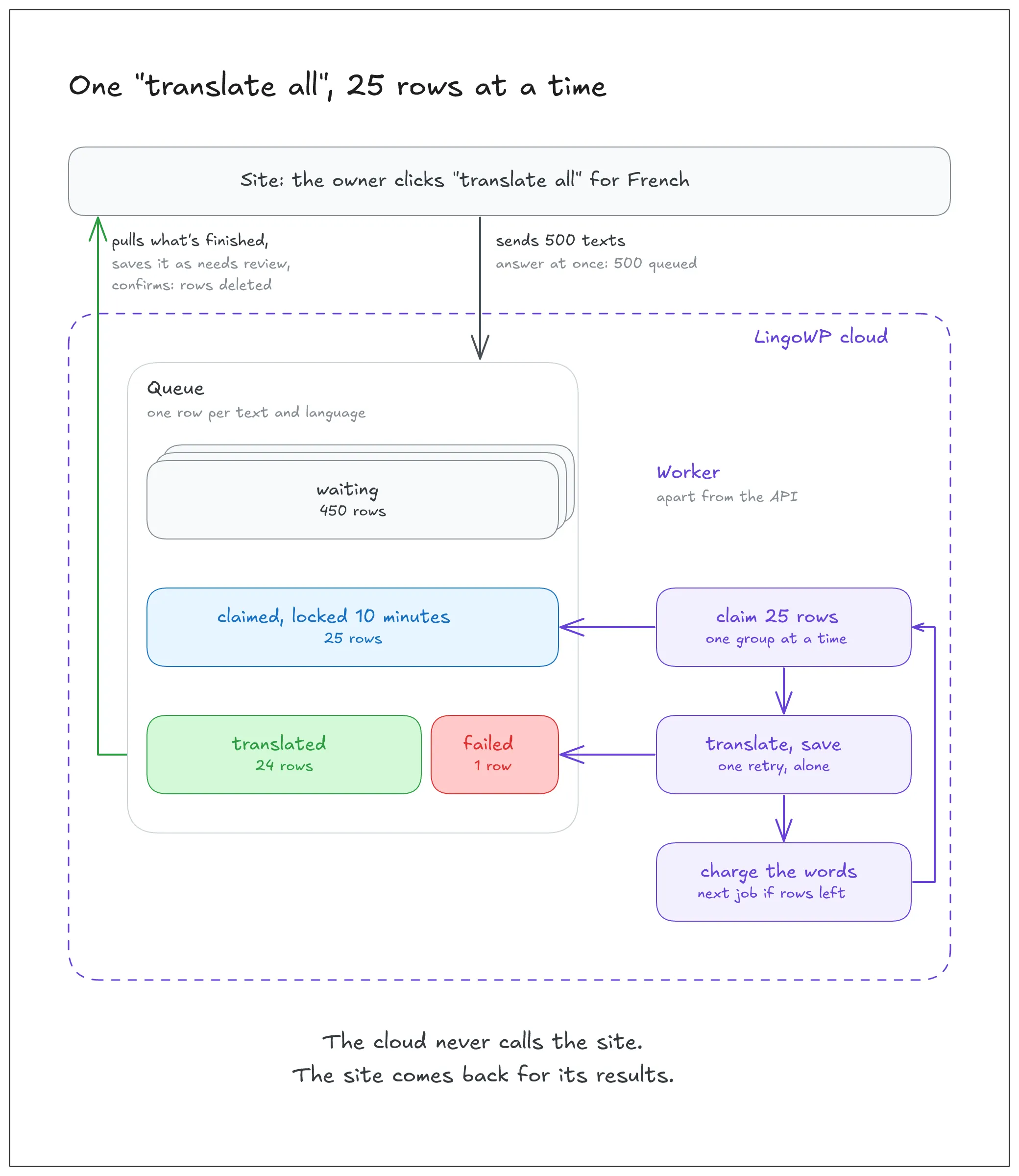
Step 1: Submitting
The site sends up to 500 texts in one request, with the languages to translate them into and, for each language, its model and writing style (chapter 9). The answer comes back at once: how many texts were queued, and how many were skipped.
Words are checked first. For LingoWP's own model, each text's words are counted before anything is stored, and texts are accepted only while the balance covers them. The rest are skipped, and the site is told how many. If nothing fits, the request is refused outright with "out of words", rather than accepted and left to wait forever. Texts going to the owner's own OpenAI or Anthropic key aren't counted.
One row per text and language. Each accepted text becomes a row: this site, this source language, this target language, this text. The text is identified by the same key the plugin uses (chapter 6), computed by a Python copy of the same rules. A sentence that appears under 500 posts is one row, translated once and charged once. Sending the same scope twice adds nothing: rows already waiting are kept as they are.
One job per site and language. For each language pair in the request, the cloud starts a job. A lock on "site, source language, target language" makes sure only one job waits for a pair at a time. A second click doesn't start a second job that would fight the first one for the same rows.
Step 2: Claiming a batch
The job claims up to 25 rows for its site and language pair. Claiming means two things:
- Sorted by group. Rows are taken group by group (a post's body, a widget's title, a menu), so one call to the model sees text of one kind and doesn't mix a page's paragraphs with a button label.
- Locked for ten minutes. Each claimed row is marked as taken until a time ten minutes ahead. If the worker crashes in the middle of a batch, the lock simply runs out, and the rows can be claimed again. Two jobs never take the same row, because rows already locked by another claim are skipped, not waited on.
The claim is saved at once, in a short transaction, before the model is called. A model call takes seconds, and the database never stays locked while it runs.
Step 3: Translating
The batch is split by model and style (normally it's a single group) and sent to the right engine: LingoWP's own open model, or the owner's provider with their stored key. The model is set to answer the same way each time for the same input, which suits translation.
Protecting what isn't words. A text can hold things the model must not change. They are found before the model is called:
- the plugin's numbered markers for inline tags, such as
{1}our menu{/1}; - placeholders that plugins and themes use in their strings, such as
%s,%1$sor{name}; - web addresses, email addresses and inline HTML tags.
Two paths. Most texts contain none of these. They go through a fast path: a plain list of texts in, a plain list of translations out, in one call. A text that does contain them is cut into pieces around what's protected. The model fills in the pieces it may change, and a placeholder it is allowed to move gets a numbered slot. The model's answer must follow a fixed structure, enforced while the model writes it, and then the protected parts are put back exactly as they were.
Every answer is checked. Each slot must come back exactly once, with none missing, none repeated, and none invented. A text is either fully translated or marked as failed, never half, and one bad text never fails the rest of the batch.
One retry, done differently. A structured text that fails is retried once, on its own. Retrying the same batch again was tried first, and it failed in exactly the same way every time, because the model gives the same answer to the same request, and it cost twice as much. The failures seen in production came from the batch, not from the text: the model repeating itself across similar items, running out of room mid-answer, or putting a piece into the wrong item. A single text is a much simpler request, and that's what fixes it.
Errors stay short. When a translation fails, the row stores a short code, such as "provider unreachable" or "provider error 429", never the provider's raw error message. That message can reach the owner's screen, and it would reveal which service runs behind LingoWP's own model.
Step 4: Saving and charging
The translations and the failures are written to their rows. Only then are the words charged, and only for LingoWP's own model: words are spent for translations that exist, never for a call that failed. If the charge itself fails, the translations are kept, and the charge is logged to be settled by hand. A billing problem never throws away finished work or stops the queue.
The next batch. Before it ends, the job checks whether rows are still waiting for its pair, and if so, it starts the next job. A large request runs as a chain of small jobs, 25 rows at a time, until nothing is left. A job that crashes doesn't break the chain for the rows behind it: errors are caught, written to the rows, and the next job still starts.
Step 5: Collecting
The cloud never calls the site, so the queue works on any host, including sites behind a firewall that accepts no incoming connection. Instead, each time the board refreshes, the site asks for the rows that are finished, translated or failed, 200 at a time, in order. It saves each translation as "needs review", then confirms what it received. Confirmed rows are deleted.
Rows in the queue are temporary. Nothing stays once the site has its result. An hourly cleanup removes the rest:
- finished rows that no site came back for within 30 days;
- rows still waiting after 2 hours, which no job will ever reach.
On the site's side, a request that has had no answer for 6 hours stops showing as "in progress", so the owner can send it again.
The whole path, in short
An owner clicks "translate all" for French, on a site with 1,200 untranslated units.
- Submitting: the site sends three requests of up to 500 texts. The balance covers them all. Sentences repeated across posts become one row each, and the cloud starts one job for English to French.
- Claiming: the job takes 25 rows from the first group and locks them.
- Translating: 23 are plain sentences and go in one call. 2 contain a link marker and take the structured path. One of those fails, is retried alone, and succeeds.
- Saving and charging: 25 translations are saved, their words are charged, and the next job starts, until every row has been translated.
- Collecting: at each board refresh, the site pulls what's finished, shows it as "needs review", and confirms it. The queue for this site ends empty.
13Designing the translation workspace.
The workspace is where a site owner, an agency or a translator spends their hours, and it was designed around one question: how can a person finish more of the site, and trust what they've finished? Five principles answer it, and every part of the board follows from them:
- Always show what's left.
- Translate where you are, without opening and closing things.
- Never lose work, and never wonder whether it was saved.
- Let AI do the bulk, and let the person decide.
- Make one action count everywhere it applies.
A board shaped like the site
The board speaks the site's language, not the plugin's. Text is grouped the way an owner thinks about their site: each page and post under its own title, then Site settings, Author bios, Theme text, Template content, Plugin text, the media library. Inside a group, each row says which part of the page it is: the title, a paragraph, the SEO title, the Meta description, the Open Graph title. Nobody has to guess where a sentence will appear.
What's left is always in view. The language rail on the left shows each language with its progress. Each group shows its own counts: translated, waiting for review, missing. Each row shows its status. At any level (the site, a page, a sentence) the person knows where they stand without counting.
Finding the next thing to do
A large site has thousands of rows, and the board is built to cut straight to the ones that need work.
- Status: untranslated, needs review, translated, or ignored.
- Origin: typed by a person, translated by AI, or not translated yet.
- Content type: pages, posts, taxonomies, custom types.
- Text length: short, medium or long, so a translator can clear the quick labels first, or set aside time for long paragraphs.
- Group progress: not started, in progress, complete, or with items to review.
- Search: finds a sentence anywhere on the site.
The board keeps your place. The language, the filters and the group in view stay in the page's address. A refresh, a bookmark or a link sent to a colleague opens exactly the same view. Share collection sends a link that opens the board on one page, with every other group folded away. The Translate this page link in the WordPress admin bar does the same from any page of the site.
Translating in place
Most translations are short: a heading, a button label, a menu item. Those are edited directly in the row, and saved when the person moves on. No window opens, and the next row is one click away.
Longer or formatted text opens in an editor, with the original on the left and the translation on the right.
- Moving on without closing. Previous and Next buttons step through the group's texts, so a translator can work through a whole page in one sitting.
- Starting from the original. A sentence with a link or bold text starts with the original already in place, formatting included, so the translator replaces the words around it. A Copy button does the same for any text.
- Saving without a button. The translation saves itself a moment after typing stops, and the editor says Saving… then Saved. Pressing Ctrl+S, from habit, just shows a reminder that saving is automatic.
Formatting you can see and move
A link or a bold word inside a sentence is shown as a chip: a small solid block with the formatted text inside it, not as code. Word order changes from one language to another, so chips can be dragged to a new place in the sentence, or moved with the arrow keys. A chip can't be half-deleted or typed over: removing one takes two presses of Backspace (the first selects it, the second removes it), so a single slip doesn't break a link. If the formatting is broken, the translation simply isn't saved until it's fixed.
Seeing it in context
A sentence can read well on the board and still sit wrongly on the page. Preview on website opens the live page in the chosen language, scrolled to that sentence and highlighted. For text that only appears in the dashboard, Edit in WordPress opens it where WordPress shows it instead.
Review as a first step, not an afterthought
The board treats review as part of the work.
- Who wrote it. Every translation shows its origin: typed by a person, translated by AI, or imported from another plugin. An imported translation becomes the person's own with a single click.
- What still needs a look. AI translations, and translations whose original has changed, arrive as Needs review. A translator can also Flag for review their own work and Mark as ready later.
- Approving in one go. When a page has been read through, Approve all confirms its translations at once.
- A gentle warning. When a translation is much longer or shorter than its original, a warning appears. It's a hint, not a block, because translations naturally grow in German or French and shrink in Chinese or Japanese.
Working in bulk
Translating sentence by sentence is the exception, not the rule. The board offers the same few actions at every level:
- For one text: translate it with AI into every language at once, from the editor.
- For one page or group: Translate all, Approve all, Ignore all, Clear all, and Delete stale for theme text that no longer appears on the site.
- For one language: Translate all that's missing, or Use fallback translation, which fills a new regional language (Canadian French, say) from an existing one (French), marked for review, without ever overwriting anything.
Publishing a language when it's ready. A new language starts as a draft, invisible to visitors. When a draft passes 90%, Publish ready languages puts it live in one click. Publishing earlier is allowed, but the board explains first that search engines might index pages that are still in the original language.
AI that keeps the person informed
When a person sends text to AI, the rows being translated show a soft moving shimmer, and the translations appear on their own as they arrive, with the progress bars rising along with them. Nobody has to refresh the page or wonder whether anything is happening. When the work is done, the board goes quiet.
When AI can't run, the board says why and what to do: add an API key, subscribe to a plan, or switch to LingoWP's own model. One menu sets the same model for every language.
One action, everywhere it applies
A sentence often appears in many places: the same heading on several pages, the same button in several groups. They share one translation, so the board treats them as one. Translating it in one place turns every copy on the screen to translated at the same moment, and updates each group's counts. The translator sees the effect of their work across the whole site, and never translates the same sentence twice.
Speed the person doesn't notice
The board opens at once, even on a large site, and scrolling through thousands of rows stays smooth. Rarely used parts, such as the editor and the language manager, load only when they're first needed. The plugins-and-themes board shows each plugin's progress immediately instead of counting it on every visit. None of this is visible, and that's the point: the person thinks about the translation, not the tool.
Built for the keyboard, too
Every action can be reached from the keyboard. Chips move with the arrow keys. When a button disappears, while AI is translating for example, the focus moves to the next control instead of being lost, so a keyboard user never has to start again from the top of the page.
In short
The workspace is designed so that a person always knows what's left, can act on it where they see it, and can trust what's done: every save is automatic, every AI result is reviewed, and every action on a shared sentence counts everywhere it appears.
14Features and status.
77 delivered, 1 in progress and 22 planned, across 8 areas.
Finding the text
- Post and page titles, excerpts and content, for every public content typeDelivered
- Content cut block by block, down to table cells, quote citations and verse linesDelivered
- Text kept in block settings (Search, Navigation, Post Terms), read from WordPress's block registryDelivered
- Image alt text, link titles, field placeholders and button labelsDelivered
- Categories, tags and custom taxonomiesDelivered
- Custom fields on posts and terms, from an allow-list, including repeaters and JSON valuesDelivered
- Author biosDelivered
- Site title, tagline, classic widgets and Customizer settingsDelivered
- Classic menus and block navigationDelivered
- Media title, caption, description and alt textDelivered
- Text printed by the theme or a plugin, found by visiting every public pageDelivered
- New and changed text picked up on saveDelivered
- First full scan at install, and a manual "recheck the site"Delivered
- Visibility rule: drafts, private posts and hidden content types skippedDelivered
Translating
- One board, grouped by source, with progress per languageDelivered
- Search across the boardDelivered
- Editor showing the original beside the translationDelivered
- Translate once: a sentence used in many places shares one translationDelivered
- Per-field translations for custom fieldsDelivered
- Links and bold text turned into markers; broken markers refusedDelivered
- Shortcodes counted; a removed or added shortcode refusedDelivered
- Warning when a translation is much longer or shorter than its originalDelivered
- Ignore a text that shouldn't be translatedDelivered
- Changed originals: old translation kept and marked "needs review"Delivered
- "Translate this page" link in the admin barDelivered
- Languages kept as drafts until they're ready to publishDelivered
- Changing the site's source language, keeping the old content as a translationDelivered
- Different translations of the same text in different placesPlanned
- Visual editor on the live pagePlanned
- Translator role, for staff without admin rightsPlanned
- XLIFF export and import for professional translatorsPlanned
- Different content or layout per languagePlanned
- Content shown in one language only, by shortcodePlanned
- Glossary and translation memory suggestionsPlanned
AI translation
- Opt-in connection to LingoWP's cloud; disconnecting keeps every translationDelivered
- LingoWP's own translation modelDelivered
- The owner's own OpenAI or Anthropic keyDelivered
- Writing style per languageDelivered
- Translate one text, one group, or everything missing in a languageDelivered
- Every AI result saved as "needs review"Delivered
- Re-translate with a different wordingDelivered
- Background queue: batches, retries, results collected on refreshDelivered
- Word usage and remaining balance on the dashboardDelivered
- DeepL, Google and Microsoft translation enginesPlanned
Serving each language
- Language prefix in every address (/fr/), optional for the source languageDelivered
- Translated addresses built from title translationsDelivered
- Language chosen from the address, a cookie or the browserDelivered
- Internal links kept in the visitor's languageDelivered
- WordPress redirects keep the language prefixDelivered
- Fallback language per language, then the originalDelivered
- hreflang alternates with x-defaultDelivered
- Page lang and right-to-left directionDelivered
- Dates, numbers and prices written the local wayDelivered
- Untranslated pages kept out of search results (noindex)Delivered
- Language sitemap in WordPress's built-in sitemapDelivered
- Sites installed in a subfolderDelivered
- Multisite networksDelivered
- A different domain or subdomain per languagePlanned
- Language chosen from a query parameter or the visitor's countryPlanned
- Translated addresses in feeds and the REST APIPlanned
- Language sitemaps in SEO plugins' own sitemapsPlanned
- Different menu items per languagePlanned
- Content-Language header and faster language switching (prerender)Planned
Language switcher
- Dropdown, list or inline linksDelivered
- Shortcode, template function, and a link list themes can draw themselvesDelivered
- Floating switcher in a corner of the screenDelivered
- Native language names, with a region only when neededDelivered
- Accessible labels for screen readersDelivered
- Plain links that work without JavaScriptDelivered
- Design settings with a live previewDelivered
- Switcher as a block, a widget or a menu itemPlanned
Plugin and theme strings
- Scan of each plugin's and theme's stringsDelivered
- Board with the share left to translate per pluginDelivered
- Existing WordPress.org translations fetched, then completedDelivered
- PO import and downloadDelivered
- AI translation of missing stringsDelivered
- Ignore a stringDelivered
- Full plural forms per languagePlanned
Integrations (add-ons)
- WooCommerce: attribute values, variation descriptions, custom attributes and store textsDelivered
- WooCommerce: variation dropdown labels translated without breaking Add to CartDelivered
- Elementor widgets, read from each widget's own control typesDelivered
- Advanced Custom Fields text fields on posts, terms and usersDelivered
- Yoast SEO, Rank Math, SEOPress and All in One SEO titles, descriptions and breadcrumbsDelivered
- Migration from TranslatePressDelivered
- Elementor atomic widgetsPlanned
- ACF options pages and ACF blocksPlanned
- SEO titles and descriptions on category and tag archives (Yoast)Planned
- WooCommerce order emails in the customer's languagePlanned
- Several currencies in WooCommercePlanned
- Migration from Polylang and WPMLPlanned
Account and plans
- One licence key per website, stored privatelyDelivered
- Owner email confirmed by linkDelivered
- Several websites in one account, per planDelivered
- Account recovery when a key is lostDelivered
- Key replacement in one clickDelivered
- Monthly and yearly plans through PayPalDelivered
- Word packsDelivered
- Add-on download links per planDelivered
- In-app support messagesDelivered
- Insights (preview screen)In progress